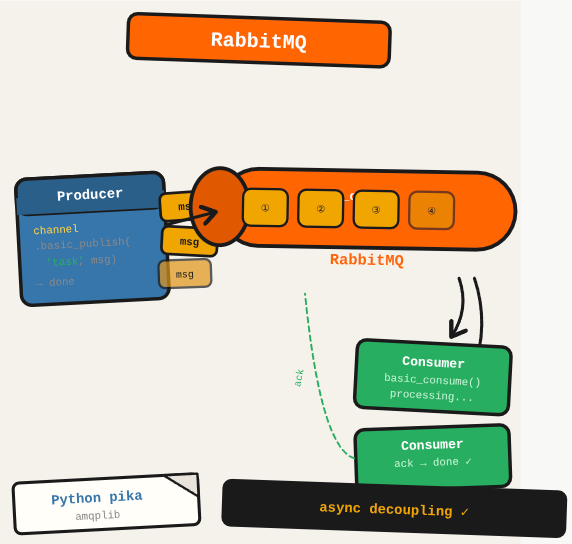
Direct service-to-service communication works until one service goes down and takes the caller with it. RabbitMQ puts a queue between producers and consumers: the sender publishes a message and moves on, regardless of whether the consumer is ready.
TL;DR: Set up RabbitMQ and implement a producer-consumer pattern: publish messages to a queue and process them asynchronously.
Stack: RabbitMQ, Python (pika), Node.js (amqplib)
Level: Intermediate
Reading time: ~8 min
How it works
RabbitMQ is a message broker that decouples communication between applications. It works with a producer-consumer model where producers publish messages to an exchange, and the exchange routes them to queues based on routing keys. Consumers read from queues independently.
Running with Docker
docker run -d --hostname my-rabbit --name rabbit13 -p 8080:15672 -p 5672:5672 -p 25676:25676 rabbitmq:3-managementThe management UI runs at http://localhost:8080. Default login is guest/guest (local access only).
Producer-consumer examples
Full working examples in Python and Node.js are available at github.com/ferrerallan/rabbitmq-example-python and github.com/ferrerallan/rabbitmq-example-nodejs.
Exchange types
Messages go to an exchange first, then the exchange routes them to queues. The routing key is the path from exchange to queue. The main exchange types are Fanout (all queues receive all messages), Direct (routes based on exact routing key match), and Topic (flexible pattern matching with wildcards).
Manual ACK
By default, RabbitMQ removes a message from the queue when it’s delivered. With manual ACK, you control when the message is acknowledged as done. This prevents message loss if the consumer crashes during processing.
Admin user setup
rabbitmqctl add_user admin yourpassword
rabbitmqctl set_user_tags admin administrator
rabbitmqctl set_permissions -p / admin ".*" ".*" ".*"
What you’ve built
A working RabbitMQ setup with a producer sending messages to a queue and a consumer processing them asynchronously. The services are decoupled: the producer doesn’t wait for the consumer.
Next steps
- Configure a dead-letter exchange (DLX) to capture messages that fail processing, so they can be inspected and reprocessed without data loss.
- Set durable=True on queues and delivery_mode=2 on messages for persistence across RabbitMQ restarts.
- Monitor queue depth and consumer utilization in the management UI to catch backpressure before it becomes an incident.
Questions or feedback? Find me on LinkedIn or GitHub.