The mysqldump finished without complaining about a single line, and for a second you get that calm of someone who thinks the job is done. Then the file gets pointed at the shiny new RDS instance, enter is pressed with confidence, and the import dies on the very first function with an error about a SUPER privilege nobody has and a root@localhost that on RDS simply does not exist. The dump was honest. The destination just plays by other rules. This post walks through migrating a MySQL 5 database into MySQL 8 running on RDS, and the three or four gotchas that turn a “just copy the data” into a whole afternoon of investigation.
TL;DR: Export a MySQL 5 database with
mysqldumpand import it cleanly into MySQL 8 on Amazon RDS, working around GTID, DEFINER, function creation, and the naming mess around the utf8 charset.
Stack: MySQL 5.x, MySQL 8 on Amazon RDS, mysqldump, InnoDB, bash, sed
Level: Intermediate
Reading time: ~6 min
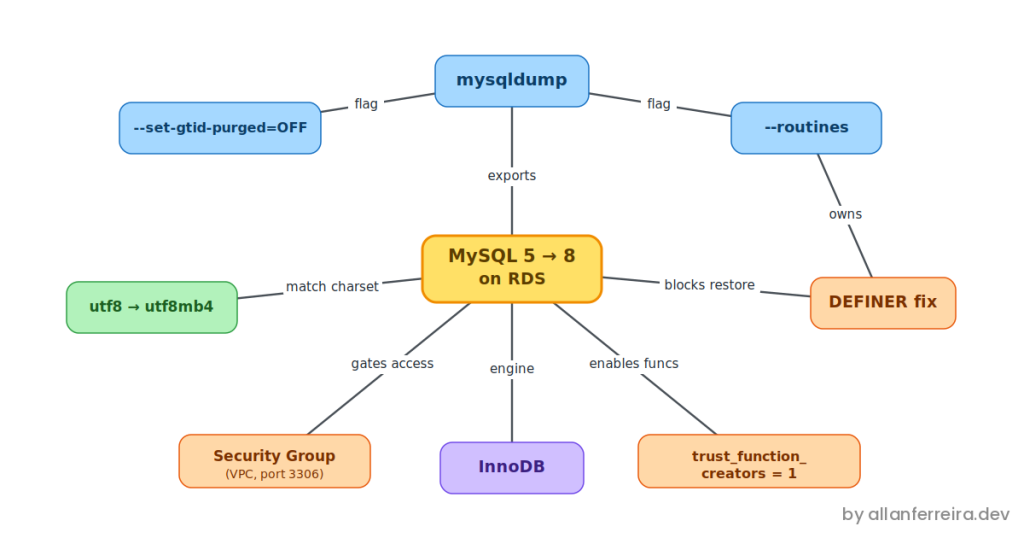
It helps to understand what is actually going on, because a dump-and-restore (generating the file on the source and reloading it on the destination) between MySQL 5 and 8 on RDS crosses three borders at once, and each one bites in its own way. First, an acronym that shows up a lot: RDS is the Relational Database Service, AWS’s managed relational database service, which means a MySQL that Amazon runs for you and, in exchange, locks a few doors underneath. The first border is replication: a modern dump carries GTID (Global Transaction Identifier, the global transaction identifier MySQL uses to track every transaction during replication), and a freshly created RDS instance has no business inheriting that. The second is ownership: every procedure, function, and view comes stamped with a DEFINER (the registered “owner” of that object), and RDS does not hand you the root@localhost account that stamp usually points to. The third is encoding: between MySQL 5 and 8, the name utf8 changed meaning without telling anyone. None of these is a bug. They are the seams between two versions of the database and a managed platform that deliberately withholds the SUPER privilege (the highest administrative permission in MySQL), and anyone who does not know the seams are there watches the import fail in places that look unrelated to the real cause.
I have run this migration more than once, and the first time I went in blind. The dump was clean, the network was open, and the restore still fell flat on a function the application barely even used. After twenty minutes cursing at an incomprehensible error, the fix was a single RDS parameter and one line of sed. The order below is exactly the one that spares you those twenty minutes.
Generate the dump without locking production
Everything starts at the source, and on a live database the way the data gets read matters more than what gets read. Use --single-transaction, which makes the dump read a consistent snapshot inside a single InnoDB transaction (InnoDB is the storage engine, the default one in MySQL, and the thing that gives it real transactions) instead of locking table by table as it works. That is precisely why this is safe on a busy server: InnoDB hands you a frozen photo of the data at a single instant, and whoever is writing keeps writing to the live tables the whole time.
mysqldump --single-transaction \
  --set-gtid-purged=OFF \
  --routines \
  --default-character-set=utf8mb4 \
  bd_prod > bd_prod.sql
Every flag is earning its own spot. --set-gtid-purged=OFF removes the GTID block so RDS does not try to adopt the source’s replication identity. --routines pulls your procedures and functions along, which a plain dump leaves behind. And --default-character-set=utf8mb4 controls only the connection used to read the data, so reading through the widest charset makes sure nothing gets mangled on the way out.
Strip the DEFINER before RDS sees it
This is the one that catches most people off guard. Because the dump came out with --routines, each procedure and function is marked DEFINER=root@localhost. That account does not exist on RDS, so when it goes to create the object it refuses and stalls the whole thing. The cleanest way out is to neutralize the stamp in the file before loading:
sed -i 's/DEFINER=[^*]*\*/\*/g' bd_prod.sql
That removes the ownership mark without touching the body of your routines. The objects then get created as owned by whoever runs the import, which on RDS is exactly what you want.
Let RDS create your functions
Even with the DEFINER out of the way, stored functions hit a second wall. With binary logging on (the binlog is the binary log that records every data change, and on RDS it is always on), MySQL refuses to create a function unless it trusts that it is deterministic, and it signals this with yet another SUPER privilege complaint. Since you cannot grant yourself SUPER on RDS, the lever is a parameter. In the parameter group (the group of configuration parameters attached to your instance) you set:
log_bin_trust_function_creators = 1
Apply it, let the instance pick up the value, and function creation stops fighting you. It is a one-time setting on the instance, not something you touch in the dump.
Open the door
None of the above helps if you cannot reach the database. By default an RDS instance lives inside a VPC (Virtual Private Cloud, the private, isolated network AWS gives you inside its cloud) and its security group (the group of security rules that works like a firewall in front of the instance) trusts nobody. To import from your own machine, the security group has to allow inbound traffic on port 3306 (MySQL’s default port) coming from your IP, and the instance has to actually be reachable from where you are. If it is locked in a private subnet, do not push it: run the import from an EC2 (Elastic Compute Cloud, AWS’s virtual machine) in the same VPC, where the network path already exists.
Mind the charset rename
Before loading, settle the encoding, because this is where MySQL 5 and 8 disagree on vocabulary. If the source database reports utf8mb3 / utf8mb3_general_ci, mirror that on the destination so the database default matches what your CREATE TABLE statements already carry. Worth knowing where this mess comes from: the old utf8 in MySQL was never real UTF-8, it stopped at three bytes per character, and that is why emoji and some symbols quietly vanished for years, until MySQL 8 finally rebranded that half-measure as utf8mb3, marked it obsolete, and pointed everyone at the genuine four-byte utf8mb4. So if an older server rejects utf8mb3_general_ci, know that utf8_general_ci is the same collation under its former name. Mirror the source now, modernize to utf8mb4 another day.
CREATE DATABASE bd_prod CHARACTER SET utf8mb3 COLLATE utf8mb3_general_ci;
Load it
Create the empty database first, since a single-database dump usually omits the CREATE DATABASE line, and then pour the file into it:
mysql -h your-instance.xxxx.rds.amazonaws.com \
  -u admin -p bd_prod < bd_prod.sql
With the DEFINER removed, the function parameter on, and the charset matched, this runs to the end instead of jamming on the first routine. When it finishes, check it: compare the SHOW TABLES; count between source and destination, confirm the routines landed with SHOW PROCEDURE STATUS WHERE Db = 'bd_prod';, and spot-check the row count of one or two large tables. The dump does not verify itself, so the checking is on you.
What you have done
You took a consistent snapshot of a live MySQL 5 database, through InnoDB, without locking whoever was writing, wiped the DEFINER stamps that would have made RDS choke, flipped the single parameter that lets RDS create your functions, opened a network path through the security group, and matched the charset so MySQL 8 and your old tables speak the same encoding. The data that used to live on someone else’s server now runs on a managed instance that is yours, and the routines came along for the ride instead of being left at the door.
Next steps
- Modernize the encoding: Once the migration is stable, plan the move from
utf8mb3toutf8mb4, so the database can actually store everything it claims to, emoji included. - Sort out the auth plugin early: MySQL 8 defaults to
caching_sha2_password(the new SHA-256 based password authentication scheme), and older clients or drivers may needmysql_native_passwordor an updated connector before they can log in. - Automate the dump: Bundle the export, the
sedpass, and the restore into a single script, so the next migration is one command instead of a checklist you half-remember. - Lock the door back: If you opened the security group to your IP during the import, close it afterward. A database exposed to the internet is a story that never ends well.
Questions or feedback? Find me on LinkedIn or GitHub.