You spent three sprints building the screen. Forms, dropdowns, a five-step wizard with a progress bar you were weirdly proud of. Then a user ignored all of it, pointed an AI agent at the same API your screen sits on, and finished the job in an hour while you were still in standup. This post is about what that moment actually means, and why it is not the death of your software.
TL;DR: Wiring internal APIs to an AI agent through MCP turned multi-week workflows into one-hour conversations, and it changes which parts of your product still deserve a screen.
Stack: MCP (Model Context Protocol), AI agents, internal REST APIs, business logic services
Level: Intermediate
Reading time: ~5 min
Here is what is actually going on. A traditional SaaS screen is a frozen path through your business logic: somebody decided, months ago, which fields you see, in what order, and which three of your forty endpoints that path is allowed to touch. That is a great deal when the path is common and repeated, and a terrible one the moment a user needs a route nobody anticipated. An MCP server exposes that same business logic as composable tools, so an agent can assemble a route on the fly instead of waiting for you to ship a screen for it. The real question stops being UI versus API and becomes a sharper one: which workflows deserve a fixed path, and which deserve an open one. Most teams build screens by reflex, which means they pour their best effort into hard-coding routes an agent could compose by itself, while the routes that genuinely need rails get whatever time is left.
I have been leading this shift at my company, training engineers and non-engineers alike to build with agents, and I went in with a tidy mental model of how people would use it. I was wrong in the best possible way. Last week one of them rebuilt a process that normally eats a couple of weeks and finished it in about an hour, because the agent could reach our internal APIs directly and orchestrate the whole thing end to end. I never taught him that workflow. He invented it the second the wall between him and the data came down.
This is the whammy bar all over again. Leo Fender bolted that little tremolo arm onto the Stratocaster in the fifties so players could add a gentle vibrato, a tasteful wobble at the end of a note. Then Hendrix grabbed it and did dive bombs and shrieks and sounds its designers never pictured, because a good tool has no opinion about what it is for. We built our MCP servers to expose a handful of tidy endpoints. Our users found the dive bombs.
Start where the APIs are already clean
We did not try to boil the ocean. We began with the internal systems that already had well-defined APIs, because an MCP server is only ever as good as the API underneath it. Wrapping a clean, predictable endpoint took an afternoon. Wrapping a crusty one with surprise side effects would have taken a month and produced an agent that lies to you with total confidence. Pick the boring, well-behaved APIs first and earn the trust before you go near the swamp.
Wrap the logic, do not rebuild it
An MCP server is not a new application. It is a thin adapter that takes endpoints you already own and describes them as tools an agent can call, with names and descriptions written for a reader who is not a frontend developer. Anthropic shipped MCP in November 2024 to kill the M times N problem: instead of building a bespoke connector for every pairing of tool and app, each side speaks the protocol once and the integrations collapse from M times N down to M plus N. A tool definition is mostly a name, a short description, and a schema for its inputs, something close to this in spirit:
{
  "name": "create_invoice",
  "description": "Create a draft invoice for a customer from a list of line items",
  "input_schema": {
    "customer_id": "string",
    "line_items": "array",
    "due_date": "string (ISO date)"
  }
}
The agent reads that, works out when it applies, and chains it with the next tool without anyone ever drawing a screen for the combination.
Decide what stays a screen
This is the part that needs a cool head, because the exciting takeaway, tear down all the UIs, is also the wrong one. Fixed screens still win wherever the path must be enforced or repeated: an approval flow where skipping a step is a compliance problem, a daily task a hundred people run the exact same way, anything where letting an agent improvise is how you end up explaining an incident to legal. Open agent flows win for the long tail: the exploratory, cross-system, once-a-quarter work you could never justify building a dedicated screen for. The job is to sort your product into those two buckets honestly, not to torch one of them and call it a strategy.
Treat the API as the product, not the plumbing
Once an agent is a first-class consumer of your API, the API stops being plumbing hidden behind a frontend and becomes a surface that real users touch. That should change how you design it. Verbs get clearer, errors get readable, descriptions get written for someone, or something, that has never seen your codebase. An endpoint called doStuff that returns a cheerful 200 even when it failed was survivable when only your own React app called it. It stops being survivable the moment an agent is reading that description to decide whether it should call the thing at all.
Where this leaves us
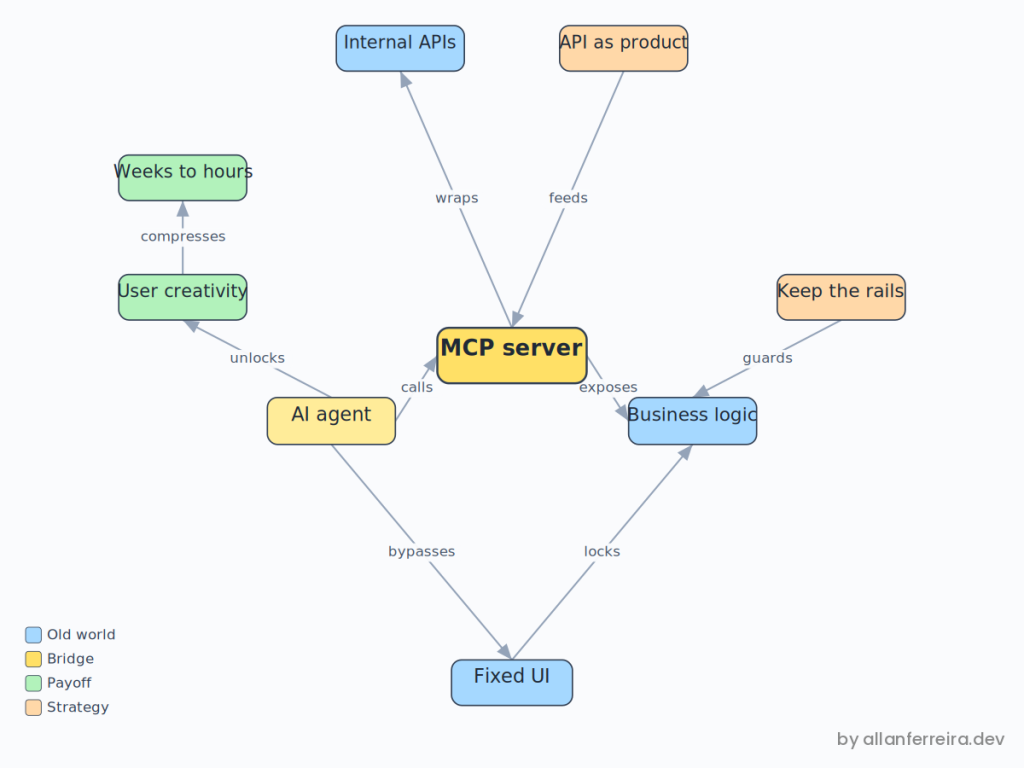
So, no, this is not the end of SaaS. That headline was always bait. What ended is the quiet assumption that every workflow earns a screen. We wrapped clean internal APIs as MCP tools, watched users orchestrate routes we never designed, kept the rails where enforcement genuinely matters, and started treating our APIs as a product surface instead of backstage wiring. The software is fine. It just grew a whammy bar, and the users already know how to play it.
Next steps
- Audit your screens: Hunt down the ones that exist only because a user once needed a path your UI never offered. Those are your first candidates to expose as tools.
- Write APIs for a non-human reader: Clear names, honest errors, real descriptions. The agent knows exactly as much as you bothered to tell it, and not a byte more.
- Keep the rails on purpose: Approvals, compliance, and high-frequency tasks still deserve a fixed UI. Choose that deliberately instead of defaulting into it.
- Start with the well-behaved APIs: Wrap the predictable endpoints first. The crusty ones can wait until you actually trust the pattern.
Building something similar, or watching your own users go off-script? Find me on LinkedIn or GitHub.