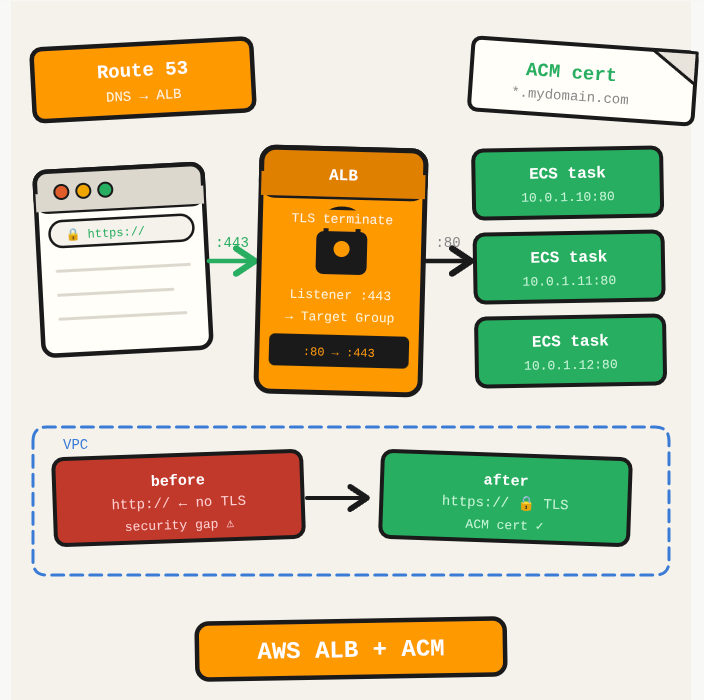
Running an ECS service without HTTPS is a security gap and a user experience issue. Adding an ALB with an ACM certificate gives you HTTPS termination, and ECS registers task IPs directly with the target group.
TL;DR: Configure an Application Load Balancer with an ACM TLS certificate to expose an ECS service over HTTPS.
Stack: AWS ALB, ECS, ACM, Route 53
Level: Intermediate
Reading time: ~8 min
Steps
- Request a certificate in ACM (AWS Certificate Manager) and validate via DNS. The certificate must be in the same region as the ALB.
- In EC2, go to Load Balancers and create an Application Load Balancer. Set it as internet-facing, select your VPC and public subnets, and configure the security group to allow ports 80 and 443.
- Create a Target Group with target type IP (for ECS Fargate tasks). Set the protocol and port to match your container.
- Add two listeners: port 80 redirecting to HTTPS (443), and port 443 forwarding to the target group with your ACM certificate attached.
- In Route 53, create an A record (Alias) in your hosted zone pointing your domain to the ALB DNS name.
- When creating or updating the ECS service, select the load balancer and target group. ECS will register task IPs automatically as tasks start.
What you’ve built
An ECS service accessible over HTTPS via an ALB, with ACM certificate for TLS termination and a Route 53 record pointing your domain to the load balancer.
Next steps
- Configure the HTTP listener to redirect all port 80 traffic to HTTPS, so users who type the domain without https:// still get encrypted traffic.
- Use ACM DNS validation (not email) for automatic certificate renewal.
- Enable ALB access logs to S3 for compliance and debugging. Athena makes analyzing those logs straightforward.
Questions or feedback? Find me on LinkedIn or GitHub.