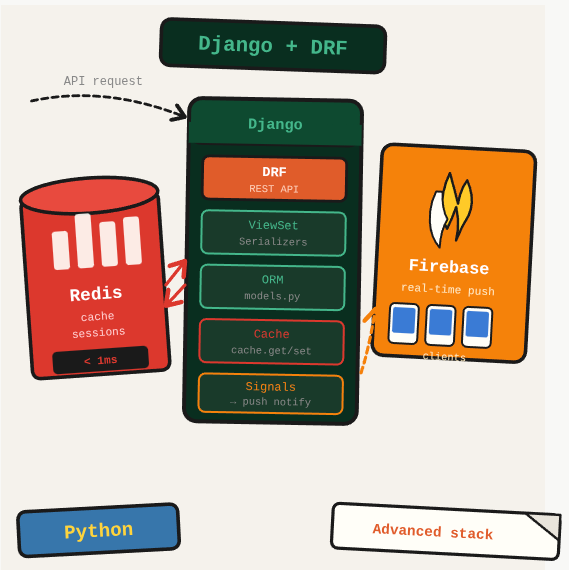
A Django API serving real-time features needs more than the ORM. Redis handles caching and session storage, Django REST Framework structures the API layer, and Firebase provides real-time push to connected clients.
TL;DR: Build a full Django backend combining DRF for REST APIs, Redis for caching, and Firebase for real-time push notifications.
Stack: Python, Django, Django REST Framework, Redis, Firebase Admin SDK
Level: Advanced
Reading time: ~20 min
Django + DRF setup
pip install Django djangorestframework
django-admin startproject myproject .
django-admin startapp app
python manage.py makemigrations
python manage.py migrate
python manage.py createsuperuser
DRF view (APIView pattern)
from rest_framework.response import Response
from rest_framework import status
from rest_framework.views import APIView
from app.models import Platform

class PlatformView(APIView):
    def get(self, request):
        contents = Platform.objects.all()
        result = [{"id": c.id, "name": c.name} for c in contents]
        return Response(result, status=status.HTTP_200_OK)

    def post(self, request):
        name = request.data.get('name')
        if name is None:
            return Response({"message": "name is required"}, status=status.HTTP_400_BAD_REQUEST)
        obj = Platform(name=name)
        obj.save()
        return Response({"id": obj.id, "name": obj.name}, status=status.HTTP_200_OK)

    def put(self, request, id):
        obj = Platform.objects.get(id=id)
        obj.name = request.data.get('name')
        obj.save()
        return Response({"message": "updated"}, status=status.HTTP_200_OK)

    def delete(self, request, id):
        Platform.objects.get(id=id).delete()
        return Response({"message": "deleted"}, status=status.HTTP_200_OK)
Django filters
# Simple field filter
Country.objects.filter(name="Brazil")

# Multiple fields
Country.objects.filter(name="Brazil", code2="BR")

# LIKE
Country.objects.filter(name__contains='Br')

# Via foreign key
Country.objects.filter(vocabulary__main=True)
Redis: reading and writing
import redis

client = redis.Redis(
    host="your-redis-host.com",
    port=14456,
    password="your-password",
    decode_responses=True
)

# Write
client.json().set('pendingUsers', '$', {"user": {"id": 1, "name": "Allan"}})

# Read
body = client.json().get('pendingUsers')
print(body["user"]["id"])
Firebase real-time database
pip install pyrebaseimport pyrebase
firebaseConfig = {
"apiKey": "YOUR_API_KEY",
"authDomain": "yourapp.firebaseapp.com",
"databaseURL": "https://yourapp-default-rtdb.firebaseio.com/",
"storageBucket": "yourapp.appspot.com",
}
firebase = pyrebase.initialize_app(firebaseConfig)
database = firebase.database()
database.child("instruments").update({"guitar": "ibanez"})What you’ve built
A production-pattern Django backend: REST endpoints built with DRF, Redis for caching and messaging, and Firebase for real-time client updates.
Next steps
- Use Redis as a Django cache backend (django-redis) to cache expensive database queries with automatic expiry.
- Structure Firebase notifications with a data payload rather than a notification payload if you want the client app to control display.
- For high-throughput notification sending, publish to a Redis queue and process with a Celery worker rather than blocking the request cycle.
Questions or feedback? Find me on LinkedIn or GitHub.