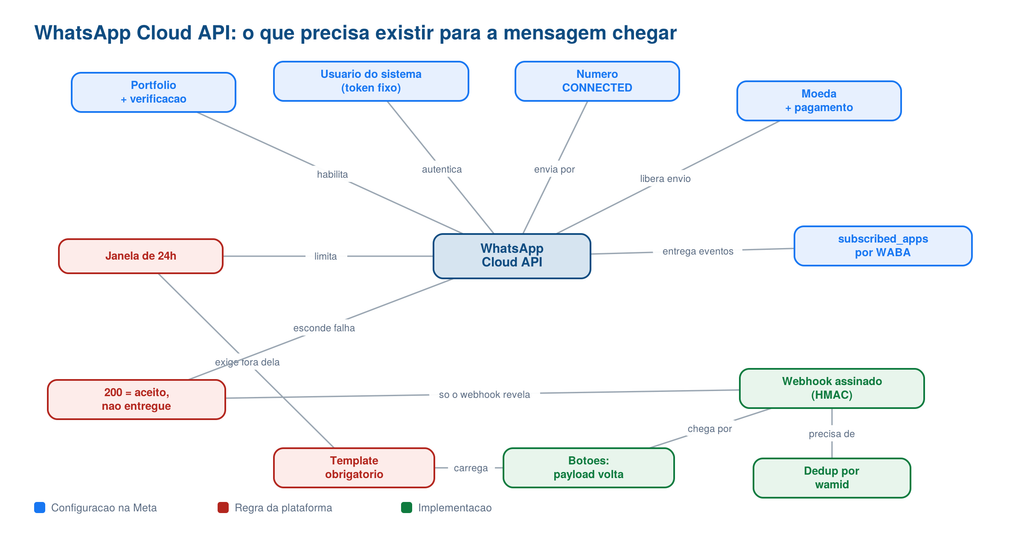
Your app needs to send a PDF to a customer on WhatsApp. You read the Meta docs, they look short, so you block an afternoon. Four days later you have three WhatsApp Business Accounts, a phone number stuck in a state nobody documents, and messages that return HTTP 200 and never arrive, with no error anywhere in your logs. This post is the map I wish I had, every step from a blank Facebook account to a delivered PDF with working reply buttons.
TL;DR: Set up WhatsApp Cloud API end to end, from Meta account to a production number sending template messages with document attachments and quick reply buttons.
Stack: Meta WhatsApp Cloud API, Graph API v23.0, ASP.NET Core 8, EF Core, MySQL, React, ngrok
Level: Advanced
Reading time: ~18 min
WhatsApp is not an email gateway. You cannot send whatever you want whenever you want, because the platform is built around a consent model: a business may message a person freely only inside a 24-hour window that the person opened by writing first. Outside that window, the only thing that gets delivered is a pre-approved template. And the API will not tell you when you cross that line. It answers 200 with a message id either way, then drops the message silently and reports the failure through a webhook you may not have configured yet. Everyone integrating transactional messaging hits this, and the cost of not understanding it is days spent debugging code that was correct the whole time.
I lost an entire afternoon to exactly this. The send returned 200, the response carried a wamid, the logs were clean, and my phone stayed quiet. I rewrote the payload three times before I accepted that the code was fine and the platform was telling me nothing. The webhook was the missing instrument, and the moment I wired it up the real reason appeared in plain text within seconds.
The accounts, in the order that works
Meta’s console punishes you for doing this out of order. Everything hangs off a personal Facebook account, because there is no such thing as a company login. Turn on two factor first, since the business portfolio will demand it later and discovering that mid flow is a special kind of annoying. It lives in the Accounts Center, not where you expect:
https://accountscenter.facebook.com/password_and_security/two_factor
Then the business portfolio at business.facebook.com. The field labeled “legal name” is the one Meta matches against government records, and it is not your brand. In Brazil that means razão social, not nome fantasia. The field labeled “Tax ID (EIN)” is the American name for whatever your country uses, so Brazilian readers type the CNPJ there, digits only. Get the address right down to the house number: a missing number is the single most common verification rejection.
Business verification itself is not available on demand. It appears only once your portfolio owns something that requires it, which in practice means after you create a WhatsApp Business Account. If the Security Center tells you “your organization does not need to be verified”, that is a step that has not unlocked yet. Keep going and come back.
The app and the free test number
Create the app at developers.facebook.com/apps with the WhatsApp use case. One small trap: Meta rejects any app name containing “WhatsApp”, along with FB, Face, Book, Insta and Gram. Name it after your product.
Finishing the use case setup gives you a free test number (a US number in the fictional 555 range, valid 90 days, capped at five pre-registered recipients). Use it. It costs nothing and needs no verification, so you can build the entire integration before committing to a real phone line.
A permanent token that does not expire in 24 hours
The dashboard hands you a temporary token that dies in a day. The real one comes from a system user, which is a robot identity owned by your business. Create it in Business Settings, then grant it access to the app, and this is where almost everyone gets stuck. Assigning the app from the Apps screen with “full control” does not work. The system user needs the asset granted from its own side, with the Develop app capability specifically:
Business Settings > Users > System Users > [your user] > ... > Add assets
  > Apps > [your app] > enable "Develop app"
Then generate the token with whatsapp_business_messaging and whatsapp_business_management, expiry set to Never. If the permission list comes back empty after you assigned the asset, hard refresh the page. Business Manager caches permissions aggressively, and a plain reload is not enough. I stared at “No permissions available” for twenty minutes before a Ctrl+Shift+R fixed it.
Getting a real number onto Cloud API
A phone number can live in exactly one place at a time. If the WhatsApp app is installed on it, Cloud API will refuse it, and uninstalling does nothing: the account still exists server side. You have to open the app on that phone and run Settings, Account, Delete my account. There is no migration that preserves the app account, so a number with history is a number you are about to lose history on.
If you inherit a number that was registered on the old On-Premises API, request_code will fail with this:
{"error":{"code":136024,"error_subcode":2388091,
  "error_user_msg":"Falha no código do pedido: Nossos servidores estão
   temporariamente indisponíveis. Aguarde 1 hour antes de tentar novamente."}}
That message is wrong, and waiting an hour changes nothing. Subcode 2388091 actually means “this phone number is not eligible to receive a verification code because it is not being migrated”, which is a completely different problem with a completely different fix. I burned two hours on the literal reading before looking up the subcode.
Direct /register is also closed to you:
{"error":{"message":"Register endpoint is not available for SMB businesses."}}
That endpoint is reserved for Solution Providers. As a direct integrator you add the number through Embedded Signup in the app dashboard (API Setup, “Add phone number”), which handles the SMS verification. But Embedded Signup leaves the number verified and not registered, which shows up as status: PENDING, platform_type: NOT_APPLICABLE, and any send failing with (#133010) Account not registered. The last mile is a single call with a six-digit PIN you choose:
curl -X POST "https://graph.facebook.com/v23.0/$PHONE_NUMBER_ID/register" \
  -H "Authorization: Bearer $META_TOKEN" -H "Content-Type: application/json" \
  -d '{"messaging_product":"whatsapp","pin":"568405"}'
Keep that PIN. You need it to re register the number later. Verify the result before moving on:
curl -s "https://graph.facebook.com/v23.0/$PHONE_NUMBER_ID\
?fields=display_phone_number,status,platform_type,quality_rating" \
  -H "Authorization: Bearer $META_TOKEN"
You are looking for "status":"CONNECTED" and "platform_type":"CLOUD_API". Anything else and sends will fail.
Currency, payment, and the error that names its own fix
A fresh WhatsApp Business Account has no currency configured, and template sends fail with 131042. The useful part is that Meta embeds the repair link in the error payload:
{"code":131042,"title":"Business eligibility payment issue",
 "error_data":{"details":"Message failed to send because your WhatsApp Business
  account currency is not configured. Visit https://business.facebook.com/
  billing_hub/accounts/details/?business_id=...&wizard_name=CHANGE_COUNTRY_CURRENCY"}}
Follow it, set country and currency, attach a card. One detail that cost me another round trip: if your billing profile carries a company tax ID and the card belongs to an individual, the authorization is declined and you get the same 131042 with a different details string (“one or more errors related to your payment method”). Matching the tax ID on the billing profile to the cardholder fixed it. Brazil has billed in BRL through a local Meta entity since July 2026, so invoices arrive as a local boleto rather than a foreign card charge.
Subscribe the app to every WABA, individually
This one is invisible until it bites. Configuring the webhook in the app dashboard is not enough: the app also has to be subscribed to each WhatsApp Business Account. The test WABA gets subscribed automatically during setup, your production WABA does not. Mine received exactly zero webhooks until I checked:
curl -s "https://graph.facebook.com/v23.0/$WABA_ID/subscribed_apps" \
  -H "Authorization: Bearer $META_TOKEN"
# {"data":[]}   <- nothing will ever arrive

curl -X POST "https://graph.facebook.com/v23.0/$WABA_ID/subscribed_apps" \
  -H "Authorization: Bearer $META_TOKEN"
# {"success":true}
Worth knowing while you are in here: templates belong to the WABA, not to the phone number. A template approved on your test account does not exist on your production account, so budget for creating and approving each one twice.
Configuration that stays out of Git
Everything the integration needs is five values. Flat META_* names in a .env that the host loads before CreateBuilder, so dotnet run works with nothing exported:
META_TOKEN=EAAUoa...                      # system user token, never expires
META_PHONE_NUMBER_ID=1412511851939679     # internal id, not the phone number
META_WEBHOOK_VERIFY_TOKEN=any-random-string
META_APP_SECRET=32-hex-chars              # app dashboard, Basic settings
META_TEMPLATE_PEDIDO=order_confirmation
public static WhatsappOptions From(IConfiguration cfg)
{
    var o = new WhatsappOptions
    {
        Token = cfg["META_TOKEN"] ?? "",
        PhoneNumberId = cfg["META_PHONE_NUMBER_ID"] ?? "",
        WebhookVerifyToken = cfg["META_WEBHOOK_VERIFY_TOKEN"] ?? "",
        AppSecret = cfg["META_APP_SECRET"] ?? "",
    };
    if (!string.IsNullOrWhiteSpace(cfg["META_TEMPLATE_PEDIDO"]))
        o.TemplateName = cfg["META_TEMPLATE_PEDIDO"]!;
    return o;
}
Note that META_PHONE_NUMBER_ID is an internal identifier, not a phone number. I wasted a round trip assuming otherwise. You can always confirm which number an id maps to by fetching display_phone_number from the id.
Creating a template with a document header, via API
The console works, but doing it through the API means the exact template is in version control instead of in someone’s browser history. A document header needs a sample file, and samples go through a two-step resumable upload that returns a handle:
LEN=$(stat -c%s sample.pdf)

SESSION=$(curl -s -X POST \
  "https://graph.facebook.com/v23.0/$APP_ID/uploads?file_length=$LEN&file_type=application/pdf" \
  -H "Authorization: Bearer $META_TOKEN" | jq -r .id)

HANDLE=$(curl -s -X POST "https://graph.facebook.com/v23.0/$SESSION" \
  -H "Authorization: OAuth $META_TOKEN" -H "file_offset: 0" \
  --data-binary "@sample.pdf" | jq -r .h)
Two things about that second call bite people: the scheme is OAuth, not Bearer, and the file_offset header is mandatory even at zero. With the handle in hand, create the template:
curl -X POST "https://graph.facebook.com/v23.0/$WABA_ID/message_templates" \
  -H "Authorization: Bearer $META_TOKEN" -H "Content-Type: application/json" \
  -d '{
  "name": "order_confirmation",
  "language": "pt_BR",
  "category": "UTILITY",
  "components": [
    {"type":"HEADER","format":"DOCUMENT","example":{"header_handle":["'"$HANDLE"'"]}},
    {"type":"BODY",
     "text":"Hi {{1}}! Order {{2}}, issued on {{3}} by {{4}}, is attached.\nUse the buttons below to confirm.",
     "example":{"body_text":[["ACME LTDA","31","12/09/2026","John"]]}},
    {"type":"FOOTER","text":"Use the buttons. Text messages are not read."},
    {"type":"BUTTONS","buttons":[
      {"type":"QUICK_REPLY","text":"Received"},
      {"type":"QUICK_REPLY","text":"Approved to invoice"},
      {"type":"QUICK_REPLY","text":"Contact me"}]}
  ]}'
Pick UTILITY over MARKETING when the message is about something the customer already did. It is roughly a tenth of the price and it is the honest classification. The body cannot start or end with a variable, buttons cap at 25 characters, and sample values are mandatory. Text only templates usually clear automated review in minutes; anything with a media header goes to a human and can take the full 24 hours, longer on an account with no sending history.
Sending: media upload, then the template
Sending a PDF is two calls. Upload it to get a media id that Meta keeps for 30 days, which saves you from hosting the file on a public URL:
using var form = new MultipartFormDataContent();
form.Add(new StringContent("whatsapp"), "messaging_product");
var file = new ByteArrayContent(pdf);
file.Headers.ContentType = new MediaTypeHeaderValue("application/pdf");
form.Add(file, "file", fileName);

using var req = Request(HttpMethod.Post, $"{_opt.PhoneNumberId}/media");
req.Content = form;
Then the template itself. Header takes the media id, body takes positional variables, and each button is its own component carrying a payload you invent:
private static readonly string[] ButtonActions = { "received", "invoice", "contact" };

componentes.Add(new {
    type = "header",
    parameters = new object[] {
        new { type = "document", document = new { id = mediaId, filename = fileName } },
    },
});

componentes.Add(new {
    type = "body",
    parameters = new object[] {
        new { type = "text", text = customer },
        new { type = "text", text = orderNumber },
        new { type = "text", text = orderDate },
        new { type = "text", text = salesRep },
    },
});

for (var i = 0; i < ButtonActions.Length; i++)
    componentes.Add(new {
        type = "button",
        sub_type = "quick_reply",
        index = i.ToString(),
        parameters = new object[] {
            new { type = "payload", payload = $"order:{order.Id}:{ButtonActions[i]}" },
        },
    });
Without buttons, an inbound reply carries only a phone number and some text, so attributing it to an order means guessing: match the number against your customer table, hope the format agrees, hope the customer has only one open order. In Brazil that guess also has to survive the ninth digit that mobile numbers gained in 2013 and that half the databases in the country still do not store. With buttons, the payload you sent comes back byte for byte in the webhook, next to context.id holding the wamid of the original message. Two exact identifiers, so the attribution stops being a guess.
Wiring the webhook
Two routes, both anonymous, because Meta does not carry your JWT. The GET is a one-time handshake, and it has a detail that wastes an afternoon if you miss it: the challenge must come back as plain text. Return it as JSON and Meta rejects the URL without explaining why.
[HttpGet]
public IActionResult Verify(
    [FromQuery(Name = "hub.mode")] string? mode,
    [FromQuery(Name = "hub.verify_token")] string? verifyToken,
    [FromQuery(Name = "hub.challenge")] string? challenge)
{
    if (mode != "subscribe" || verifyToken != _opt.WebhookVerifyToken) return Forbid();
    return Content(challenge ?? "", "text/plain");
}
The POST is where events arrive, and the moment it writes to your database it becomes an attack surface: the route is public, so anyone who learns the URL could forge “the customer approved this order”. Validate the HMAC of the raw body against your App Secret, and read the body as a string rather than a bound model, because model binding consumes the stream before you can hash it:
[HttpPost]
public async Task<IActionResult> Receive(CancellationToken ct)
{
    using var reader = new StreamReader(Request.Body, Encoding.UTF8);
    var body = await reader.ReadToEndAsync(ct);

    if (!SignatureValid(body))
    {
        _log.LogWarning("Invalid signature. Body ignored.");
        return Ok();                      // still 200: an error means Meta retries forever
    }

    try { await ProcessAsync(body, ct); }
    catch (Exception ex) { _log.LogError(ex, "Webhook processing failed."); }

    return Ok();
}

private bool SignatureValid(string body)
{
    if (string.IsNullOrWhiteSpace(_opt.AppSecret)) return false;   // fail closed

    var header = Request.Headers["X-Hub-Signature-256"].ToString();
    if (!header.StartsWith("sha256=", StringComparison.OrdinalIgnoreCase)) return false;

    using var hmac = new HMACSHA256(Encoding.UTF8.GetBytes(_opt.AppSecret));
    var expected = Convert.ToHexString(hmac.ComputeHash(Encoding.UTF8.GetBytes(body)))
        .ToLowerInvariant();
    var received = header["sha256=".Length..].ToLowerInvariant();

    return received.Length == expected.Length
        && CryptographicOperations.FixedTimeEquals(
            Encoding.ASCII.GetBytes(received), Encoding.ASCII.GetBytes(expected));
}
Always return 200, even when you reject the payload. A non-200 tells Meta the delivery failed and it retries, which turns a rejected forgery into a retry storm. And fail closed on a missing App Secret: an empty tray beats a forged approval sitting in your orders table.
Storage: one table, two directions
The screen needs sends and replies interleaved chronologically, so two tables would mean a UNION on every query. One table with a direction column gives you a plain ORDER BY:
CREATE TABLE whatsapp_message (
  id             INT NOT NULL AUTO_INCREMENT,
  tenant_id      INT NOT NULL,
  direction      CHAR(1) NOT NULL,          -- 'E' outbound, 'R' inbound
  wamid          VARCHAR(128) NULL,
  phone          VARCHAR(20) NOT NULL,
  order_id       INT NULL,
  type           VARCHAR(20) NOT NULL,      -- template | text | button
  content        TEXT NULL,
  payload        VARCHAR(100) NULL,
  context_wamid  VARCHAR(128) NULL,
  delivery_status VARCHAR(20) NULL,         -- accepted|sent|delivered|read|failed
  error          VARCHAR(500) NULL,
  created_at     DATETIME NOT NULL,
  PRIMARY KEY (tenant_id, id),
  UNIQUE KEY ux_whatsapp_id (id),
  UNIQUE KEY ux_whatsapp_wamid (wamid),     -- Meta retries. This is the dedup.
  KEY ix_whatsapp_date (tenant_id, created_at)
) ENGINE=InnoDB DEFAULT CHARSET=utf8mb4;
Meta redelivers an event whenever it does not get a 200 in time, and I watched the same wamid arrive twice in the ngrok inspector. Without the constraint you get duplicate rows on screen and, worse, duplicate side effects: two notification emails from one button tap. Make the insert return a boolean and let the caller skip the side effect when the row already existed.
Two smaller decisions that save you later. Use Meta’s timestamp field (epoch seconds) rather than server time, so a delayed event sorts where it belongs instead of jumping to the top. And wrap the outbound insert in try/catch, because by the time you reach it Meta has already accepted the message: letting a database hiccup surface as a failure would make the user resend, and the customer would get the PDF twice.
Debugging what you cannot see
In development the webhook needs a public HTTPS URL, which is what ngrok is for. The part people miss is the inspector it runs alongside the tunnel:
ngrok http 8088
curl -s "http://127.0.0.1:4040/api/requests/http?limit=20"
It returns every request with its full body, including the ones your app mishandled. That endpoint is how I finally saw the real failure, verbatim, after two days of messages vanishing:
STATUS: failed
  131042  Business eligibility payment issue
  "Message failed to send because your WhatsApp Business account
   currency is not configured."
Nothing else in the stack would have told me that, because the send itself had returned 200.
One last trap while you are testing: hello_world, the sample template every tutorial reaches for, only works from a test number. From a production number it fails with (#131058) Hello World templates can only be sent from the Public Test Numbers, which looks like your number is broken when it is just Meta protecting its demo template.
What you have done
You went from a bare Facebook account to a production WhatsApp number that sends an approved template with a PDF attached and three reply buttons, with a webhook that validates Meta’s signature, deduplicates retries, records delivery status, and maps each button tap back to the exact order through a payload you control. Along the way you learned that HTTP 200 means accepted and nothing more, that an error message about server availability can mean something else entirely, and that the webhook is the only instrument that reports what actually happened. The platform is still going to surprise you. At least now it does it in writing.
Next steps
- Watch quality rating: Meta scores your number on how recipients react. A GREEN number messages freely; a RED one gets throttled, and you find out from the dashboard rather than from an error.
- Budget by distinct customers: You are billed for the first message of each conversation, so the cost tracks unique recipients per month, not messages sent. In Brazil, utility templates run R$ 0.0350 per delivered message as of October 2026.
- Replace ngrok before launch: The tunnel URL changes every restart and the webhook has to be reconfigured each time. Point it at your real domain the day you go live.
- Handle free text anyway: Customers will type instead of tapping, footer or no footer. Decide now whether that reaches a human or an auto reply, because silence is worse than either.
Questions or feedback? Find me on LinkedIn or GitHub.