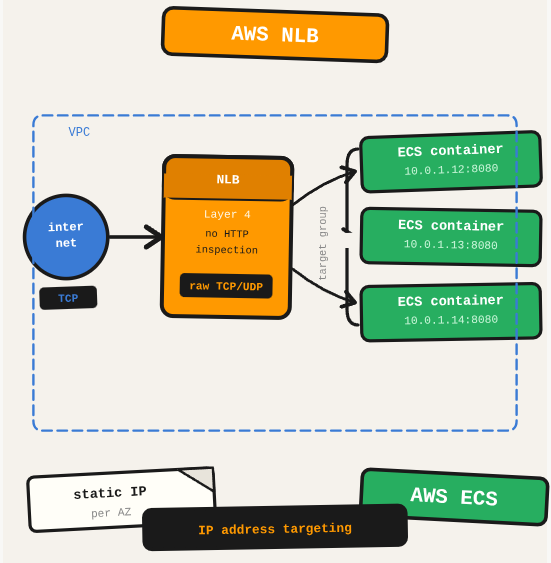
Application Load Balancers work well for HTTP/HTTPS traffic, but when you need to handle raw TCP/UDP at high throughput with minimal latency, a Network Load Balancer is the right choice. It operates at Layer 4 and routes connections directly to target IPs without inspecting HTTP headers.
TL;DR: Set up an AWS Network Load Balancer (NLB) and route TCP traffic to ECS containers via a target group with IP address targeting.
Stack: AWS NLB, ECS, Target Groups, VPC
Level: Intermediate
Reading time: ~6 min
An NLB operates at the connection level (Layer 4), meaning it handles raw TCP and UDP without looking at what’s inside the packets. This makes it faster and lower-latency than an ALB, which reads HTTP headers before routing. Think of it as a traffic cop who redirects cars by license plate without reading the driver’s face.
Steps
- Create the NLB: In EC2, go to Load Balancers and create one with type “Network Load Balancer.” Select your VPC and availability zones.
- Create a Target Group: Choose “IP addresses” as the target type, select the protocol/port matching your container, and add your VPC. This is how the NLB knows which container port to send traffic to.
- Add a Listener: Open the NLB, go to Listeners, and click Add Listener. Select the protocol/port and point it to the target group you just created.
- Attach to ECS Service: When creating or updating the ECS service, under Load Balancing, select the NLB listener and target group. ECS will register container IPs automatically as tasks start.
What you’ve built
An NLB with a listener, a target group pointing to your ECS container IPs, and the ECS service attached. Traffic comes in on the listener port and routes to healthy container instances.
Next steps
- Enable cross-zone load balancing on the NLB to distribute traffic evenly across containers in all availability zones.
- Configure health checks on the target group so the NLB only sends traffic to healthy container instances.
- For TLS termination at the load balancer, add a TLS listener with an ACM certificate instead of handling TLS inside your container.
Questions or feedback? Find me on LinkedIn or GitHub.