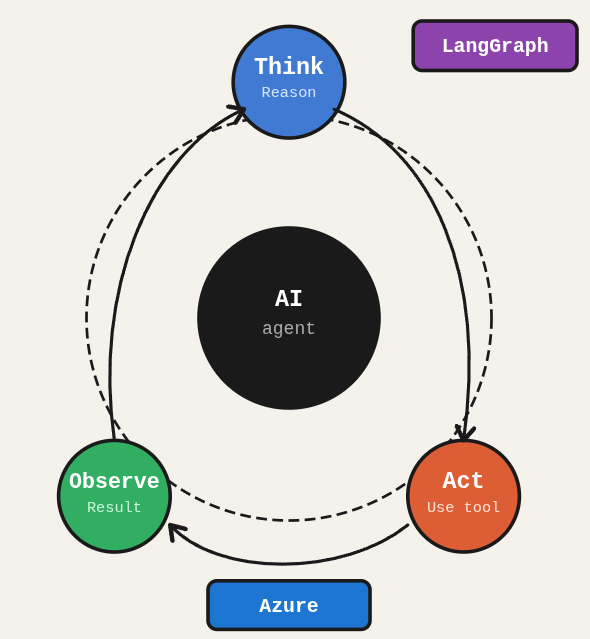
You want an AI agent that actually reasons, queries databases, and uses tools intelligently. Not a chatbot that rephrases your question back at you with a slightly different tone. The ReAct pattern with LangGraph and Azure OpenAI is how you build that.
TL;DR: Build a production-ready AI agent using LangGraph’s ReAct pattern with Elasticsearch (vector search), Neo4j (graph recommendations), and Streamlit (UI), deployed on Azure OpenAI.
Stack: Python, LangGraph, LangChain, Azure OpenAI, Elasticsearch, Neo4j, Streamlit, Poetry
Level: Advanced
Reading time: ~20 min
I built this system at SOFA Digital to power intelligent search and recommendations over media catalogs. The architecture here is the same pattern, adapted as a self-contained tutorial. It is not trivial, but if you follow each step you will have a real agent, not a demo toy.
Configuring Poetry
(Because manually managing dependencies is a form of suffering we no longer accept.)
poetry init
Modifying toml
The generated pyproject.toml needs to list your dependencies. Set the Python version and add all the packages the agent will use.
[tool.poetry]
name = "ai-react-agent-azure"
version = "0.1.0"
description = ""
authors = ["Allan Ferreira <[your-email@example.com]>"]
[tool.poetry.dependencies]
python = "^3.10"
python-dotenv = "^1.0.1"
black = "^24.10.0"
isort = "^5.13.2"
langchain = "^0.3.14"
langchain-openai = "^0.3.0"
langgraph = "^0.2.62"
grandalf = "^0.8"
streamlit = "^1.41.1"
chromadb = "^0.6.2"
sentence-transformers = "^3.3.1"
langchain-community = "^0.3.14"
elasticsearch = "^8.17.1"
neo4j = "^5.28.1"
[tool.poetry.dev-dependencies]
[build-system]
requires = ["poetry-core>=1.0.0"]
build-backend = "poetry.core.masonry.api"
Install
Activate the virtual environment and install all dependencies in one shot.
poetry shell / poetry install
Streamlit Hello World (hello_streamlit.py)
Before building the full agent UI, verify that Streamlit is working correctly with a simple sanity check app.
# hello_world.py
import streamlit as st
def main():
# Basic page configuration
st.set_page_config(
page_title="Hello World App",
page_icon="👋",
layout="centered"
)
# Application title
st.title("Hello, World! 👋")
# Adding a welcome message
st.write("Welcome to our first Streamlit application!")
# Adding a separator
st.divider()
# Adding a simple interactive section
st.subheader("Interactive Section")
# Text field for user to enter their name
user_name = st.text_input("What's your name?")
# Button to greet the user
if st.button("Greet"):
if user_name:
st.success(f"Hello, {user_name}! Welcome to our product recommendation system!")
else:
st.error("Please enter your name first.")
# Adding a sidebar with information
with st.sidebar:
st.header("About")
st.info("""
This is a simple demonstration application using Streamlit.
We'll evolve this interface into a complete product recommendation system
with LangGraph and a ReAct agent.
""")
if __name__ == "__main__":
main()
Create state.py
LangGraph is state machine-based. This file defines the shared state object that flows between every node in the agent graph.
# state.py
import operator
from typing import Annotated, TypedDict, Union
from langchain_core.agents import AgentAction, AgentFinish
class AgentState(TypedDict):
"""
Defines the state structure for the recommendation agent.
Attributes:
input: The user's input query
agent_outcome: The result from the agent (either an action to take or the final answer)
intermediate_steps: A list of previous actions and their results
"""
input: str
agent_outcome: Union[AgentAction, AgentFinish, None]
intermediate_steps: Annotated[list[tuple[AgentAction, str]], operator.add]
test state (tests/test_state.py)
# test_state.py
import unittest
from state import AgentState
from langchain_core.agents import AgentAction, AgentFinish
from typing import cast, Any
class TestAgentState(unittest.TestCase):
def test_state_operations_and_type_behavior(self):
"""Test that AgentState properly handles operations and type behavior."""
# Create test actions
action1 = AgentAction(
tool="search_products",
tool_input="smartphone",
log="Searching for smartphones"
)
action2 = AgentAction(
tool="get_promotions",
tool_input="electronics",
log="Looking for electronics promotions"
)
# Create initial state
state1 = AgentState(
input="I need a new smartphone with good promotions",
agent_outcome=None,
intermediate_steps=[]
)
# Create a second state that builds upon the first
state2 = AgentState(
input=state1["input"],
agent_outcome=action1,
intermediate_steps=[
(action1, "Found Samsung Galaxy S21, iPhone 13, Google Pixel 6")
]
)
# Test the append operation on intermediate_steps
# This tests the Annotated[..., operator.add] behavior
combined_state = AgentState(
input=state2["input"],
agent_outcome=action2,
intermediate_steps=state2["intermediate_steps"] + [
(action2, "Found 20% discount on electronics")
]
)
# Verify intermediate steps were properly combined
self.assertEqual(len(combined_state["intermediate_steps"]), 2)
self.assertEqual(combined_state["intermediate_steps"][0][0].tool, "search_products")
self.assertEqual(combined_state["intermediate_steps"][1][0].tool, "get_promotions")
# Test state conversion to AgentFinish
final_state = AgentState(
input=combined_state["input"],
agent_outcome=AgentFinish(
return_values={"output": "I recommend the Samsung Galaxy S21 which has a 20% discount"},
log="Finalizing recommendation based on search and promotions"
),
intermediate_steps=combined_state["intermediate_steps"]
)
# Verify we can check if agent_outcome is an AgentFinish
self.assertIsInstance(final_state["agent_outcome"], AgentFinish)
# Test extracting the final answer from AgentFinish
if isinstance(final_state["agent_outcome"], AgentFinish):
recommendation = final_state["agent_outcome"].return_values["output"]
self.assertIn("Samsung Galaxy S21", recommendation)
self.assertIn("20% discount", recommendation)
if __name__ == "__main__":
unittest.main()
Run tests
With the state and a basic structure in place, run the test suite to catch wiring issues early.
python3 -m unittest discover tests
tools.py
(The toolbox. Because a ReAct agent without tools is just a very opinionated chatbot.)
from typing import Optional
from langchain_core.tools import tool
from langchain_openai import ChatOpenAI
@tool
def search_products_by_embedding(query: str) -> str:
"""
Searches for products semantically similar to the user's query.
Use this tool ONLY when the user is looking for specific product features or characteristics.
DO NOT use this tool for promotion requests or social recommendations.
:param query: Text describing what the user is looking for
:return: List of products similar to the query
"""
print("***** VECTOR SEARCH TOOL *****")
print(f"Query: {query}")
# Mock products data
mock_products = [
{
"name": "Samsung Galaxy S21",
"category": "Smartphones",
"brand": "Samsung",
"description": "Smartphone with 6.2 inch AMOLED display, triple 64MP camera, 8GB RAM",
"price": 799.99
},
{
"name": "iPhone 13",
"category": "Smartphones",
"brand": "Apple",
"description": "Smartphone with A15 Bionic processor, dual 12MP camera, 4GB RAM",
"price": 899.99
},
{
"name": "Xiaomi Redmi Note 11",
"category": "Smartphones",
"brand": "Xiaomi",
"description": "Smartphone with 6.4 inch display, quad camera, 6GB RAM",
"price": 500.99
}
]
if not mock_products:
return "No products found matching your query."
result = "Products found based on your description:\n\n"
for product in mock_products:
result += f"Name: {product['name']}\n"
result += f"Category: {product['category']}\n"
result += f"Brand: {product['brand']}\n"
result += f"Description: {product['description']}\n"
result += f"Price: ${product['price']:.2f}\n\n"
return result
@tool
def get_social_recommendations(user_id: str = "default_user") -> str:
"""
Gets product recommendations based on the user's social network (friends of friends).
Use this tool when the user asks for recommendations based on their social network or what's popular.
ALWAYS use this tool when the user asks about what other people are buying or what's trending.
:param user_id: User ID
:return: Products recommended based on social network
"""
print("***** SOCIAL GRAPH TOOL *****")
print(f"User ID: {user_id}")
# Mock social recommendation data
mock_results = [
{
"name": "Galaxy Buds Pro",
"category": "Accessories",
"brand": "Samsung",
"description": "Premium wireless earbuds with immersive audio and active noise cancellation",
"price": 199.99,
"social_count": 5
},
{
"name": "Smart TV 55\" Crystal UHD 4K",
"category": "Electronics",
"brand": "Samsung",
"description": "Smart TV with Crystal 4K processor, borderless design and integrated voice assistant",
"price": 649.99,
"social_count": 3
}
]
# Check if there are any smartphones in the results
smartphone_results = [p for p in mock_results if p["category"].lower() == "smartphones"]
if not smartphone_results:
result = "Popular products in your friend network:\n\n"
result += "Note: There are currently no smartphones that are popular in your social network. The most popular items are:\n\n"
else:
result = "Popular smartphones in your friend network:\n\n"
for product in mock_results:
result += f"Name: {product['name']}\n"
result += f"Category: {product['category']}\n"
result += f"Brand: {product['brand']}\n"
result += f"Description: {product['description']}\n"
result += f"Price: ${product['price']:.2f}\n"
result += f"Social: {product['social_count']} friends of your friends purchased this product\n\n"
return result
@tool
def get_promotion_by_category(category: str = "all") -> str:
"""
Searches for products on promotion with their prices and details.
IMPORTANT: This tool ALWAYS returns complete product information including prices.
Use this tool for any promotion-related queries.
:param category: Product category or "all" for all promotions
:return: List of products on promotion with complete details including prices
"""
print("***** PROMOTION TOOL *****")
print(f"Category: {category}")
# Normalize the category input
category = category.strip().lower()
# Handle different variations of "all"
all_categories = ["all", "all categories", "any", "everything", "", "all products"]
# Mock promotions data
mock_promotions = {
"smartphones": [
{
"name": "Xiaomi Redmi Note 11",
"category": "Smartphones",
"brand": "Xiaomi",
"description": "Smartphone with 6.4 inch display, quad camera, 6GB RAM",
"price": 349.99
}
],
"accessories": [
{
"name": "Galaxy Buds Pro",
"category": "Accessories",
"brand": "Samsung",
"description": "Wireless earbuds with active noise cancellation",
"price": 149.99
}
],
"footwear": [
{
"name": "Nike Air Zoom Pegasus 38",
"category": "Footwear",
"brand": "Nike",
"description": "Running shoes with Zoom Air cushioning",
"price": 119.99
}
]
}
# Show all promotions if requested
if any(cat in category for cat in all_categories):
all_promotions = []
for cat_name, products in mock_promotions.items():
all_promotions.extend(products)
if not all_promotions:
return "No promotions available at the moment."
result = "Current promotions across all categories:\n\n"
for product in all_promotions:
result += f"Name: {product['name']}\n"
result += f"Category: {product['category']}\n"
result += f"Brand: {product['brand']}\n"
result += f"Description: {product['description']}\n"
result += f"Promotional price: ${product['price']:.2f}\n\n"
return result
# Try to find a matching category
for cat_key in mock_promotions.keys():
if cat_key in category or category in cat_key:
promotions = mock_promotions[cat_key]
result = f"Products on promotion in {cat_key} category:\n\n"
for product in promotions:
result += f"Name: {product['name']}\n"
result += f"Category: {product['category']}\n"
result += f"Brand: {product['brand']}\n"
result += f"Description: {product['description']}\n"
result += f"Promotional price: ${product['price']:.2f}\n\n"
return result
# If nothing found, return all promotions
all_promotions = []
for cat_name, products in mock_promotions.items():
all_promotions.extend(products)
result = "No exact category match found. Here are all current promotions:\n\n"
for product in all_promotions:
result += f"Name: {product['name']}\n"
result += f"Category: {product['category']}\n"
result += f"Brand: {product['brand']}\n"
result += f"Description: {product['description']}\n"
result += f"Promotional price: ${product['price']:.2f}\n\n-----------------\n"
return result
@tool
def general_chat(input: str) -> str:
"""
Handles general conversation and questions not specifically about product search, promotions, or social recommendations.
Use this tool for greetings, general questions, or any input that doesn't fit the other specialized tools.
:param input: The user's input
:return: A natural, helpful response but with a little nudge toward products
"""
print("***** GENERAL CHAT TOOL *****")
print(f"Input: {input}")
# For the first version, we'll use a simplified approach
# In a real implementation, this would call the LLM
responses = {
"hello": "Hello there! I'm your product recommendation assistant. I can help you find products, check promotions, or see what's popular among your friends. What kind of products are you interested in today?",
"hi": "Hi! I'm here to help you discover great products. Would you like to know about our latest promotions or what's trending in your network?",
"help": "I can help you find products based on features you're looking for, show you current promotions, or recommend popular items from your social network. What would you like to explore?",
"default": f"Thanks for your message: '{input}'. I'm your product recommendation assistant. I can help you find products, check promotions, or see what's popular in your social network. What kind of products are you interested in today?"
}
# Simple keyword matching
for keyword, response in responses.items():
if keyword in input.lower():
return response
return responses["default"]
@tool
def verify_recommendation_consistency(recommendation_data: str) -> str:
"""
Verifies the consistency of product recommendations using an LLM.
Use this tool as the final step to ensure accurate recommendations without inconsistencies.
:param recommendation_data: String containing the query and results from all tools used
:return: A verified, accurate response
"""
print("***** VERIFICATION TOOL *****")
print(f"Verifying data: {recommendation_data[:50]}...")
# For the first version, we'll just return the data with a prefix
# In a real implementation, this would use an LLM to verify consistency
return f"Based on your requirements, I've found these matching products: {recommendation_data}"
Test tools (test_tools.py)
Unit tests for the tools use mocks so you can validate logic without needing live database connections.
# test_tools.py
import unittest
from unittest.mock import patch
from tools import (
search_products_by_embedding,
get_social_recommendations,
get_promotion_by_category,
general_chat,
verify_recommendation_consistency
)
class TestProductRecommendationTools(unittest.TestCase):
def test_search_products_by_embedding(self):
"""Test that product search returns expected results."""
# Test with a simple query
result = search_products_by_embedding.invoke("smartphone with good camera")
# Check that all expected products are in the result
self.assertIn("Samsung Galaxy S21", result)
self.assertIn("iPhone 13", result)
self.assertIn("Xiaomi Redmi Note 11", result)
# Verify pricing information is included
self.assertIn("$799.99", result)
self.assertIn("$899.99", result)
self.assertIn("$500.99", result)
# Check that descriptions are included
self.assertIn("AMOLED display", result)
self.assertIn("A15 Bionic", result)
# Verify expected formats
self.assertIn("Name:", result)
self.assertIn("Category:", result)
self.assertIn("Brand:", result)
self.assertIn("Description:", result)
self.assertIn("Price:", result)
def test_get_social_recommendations(self):
"""Test that social recommendations return expected results."""
# Test with default user - need to use .invoke() since these are LangChain tools
result = get_social_recommendations.invoke("default_user")
# Check expected content
self.assertIn("Popular products in your friend network", result)
self.assertIn("Galaxy Buds Pro", result)
self.assertIn("Smart TV", result)
# Verify social data
self.assertIn("Social:", result)
self.assertIn("friends of your friends purchased", result)
# Test with specific user
result_with_user = get_social_recommendations.invoke("test_user")
self.assertIn("Popular products in your friend network", result_with_user)
def test_get_promotion_by_category(self):
"""Test that promotion search returns expected results."""
# Test with "all" categories
all_result = get_promotion_by_category.invoke("all")
# Should include all promotions
self.assertIn("Current promotions across all categories", all_result)
self.assertIn("Xiaomi Redmi Note 11", all_result)
self.assertIn("Galaxy Buds Pro", all_result)
self.assertIn("Nike Air Zoom", all_result)
# Test with specific category - the current implementation is always returning all promotions
# so we're just testing that it returns results that include our smartphone
smartphone_result = get_promotion_by_category.invoke("smartphones")
self.assertIn("Xiaomi Redmi Note 11", smartphone_result)
# Test with non-existent category
nonexistent_result = get_promotion_by_category.invoke("laptops")
# Ensure we get some results even for non-existent categories
self.assertIn("Xiaomi Redmi Note 11", nonexistent_result)
def test_general_chat(self):
"""Test that general chat provides appropriate responses."""
# Test greeting
hello_result = general_chat.invoke("Hello there")
self.assertIn("Hello", hello_result)
self.assertIn("product", hello_result.lower())
# Test help request
help_result = general_chat.invoke("Can you help me find something?")
self.assertIn("help", help_result.lower())
# Test random input
random_result = general_chat.invoke("Just browsing")
self.assertIn("Thanks for your message", random_result)
def test_verify_recommendation_consistency(self):
"""Test that verification tool processes recommendation data."""
test_data = "iPhone 13 with good camera"
result = verify_recommendation_consistency.invoke(test_data)
# Verification should include the original data
self.assertIn(test_data, result)
self.assertIn("Based on your requirements", result)
if __name__ == "__main__":
unittest.main()
Test tools
Run the full test suite to confirm all tools are behaving before you wire them into the agent graph.
python3 -m unittest discover tests
Create ReAct agent (react.py)
(This is where the magic happens, or where you spend 3 hours debugging why the agent keeps calling the wrong tool.)
# react.py
from dotenv import load_dotenv
from langchain import hub
from langchain.agents import create_react_agent
from langchain_core.prompts import PromptTemplate
from langchain_openai import ChatOpenAI
from tools import (
search_products_by_embedding,
get_social_recommendations,
get_promotion_by_category,
general_chat,
verify_recommendation_consistency
)
# Load environment variables
load_dotenv()
# Define our tools
tools = [
search_products_by_embedding,
get_social_recommendations,
get_promotion_by_category,
general_chat,
verify_recommendation_consistency
]
# Pull the standard ReAct prompt from LangChain's hub
react_prompt = hub.pull("hwchase17/react")
# Create a language model instance
# In production, this would use your actual API key
llm = ChatOpenAI(model="gpt-3.5-turbo-1106")
# Create the ReAct agent
react_agent_runnable = create_react_agent(llm, tools, react_prompt)
test react (test_react.py)
# test_react.py
import unittest
from unittest.mock import patch
from langchain_core.agents import AgentAction
from state import AgentState
from react import react_agent_runnable, tools
class TestReactAgent(unittest.TestCase):
@patch('react.ChatOpenAI')
def test_agent_tool_selection(self, mock_chat):
"""Test that the agent can parse inputs and select appropriate tools."""
# Create a simplified state
state = AgentState(
input="I'm looking for a smartphone with a good camera",
agent_outcome=None,
intermediate_steps=[]
)
# Setup our mock to return a predefined action
mock_instance = mock_chat.return_value
mock_instance.invoke.return_value.content = """Thought: The user is looking for a smartphone with a good camera. I should use the search tool to find relevant products.
Action: search_products_by_embedding
Action Input: smartphone with good camera"""
# Call the agent with our state
try:
result = react_agent_runnable.invoke(state)
# Check that the result is an AgentAction
self.assertIsInstance(result, AgentAction)
# Check that the correct tool was selected
self.assertEqual(result.tool, "search_products_by_embedding")
# Check that the action input makes sense
self.assertIn("smartphone", result.tool_input.lower())
self.assertIn("camera", result.tool_input.lower())
except Exception as e:
# If we can't actually invoke the agent in test (due to API keys, etc.),
# we'll skip detailed assertions but ensure the test structure is valid
print(f"Full agent testing skipped: {e}")
pass
def test_tools_availability(self):
"""Test that all expected tools are available to the agent."""
# Check that we have the correct number of tools
self.assertEqual(len(tools), 5)
# Check that each tool exists and has the expected name
tool_names = [tool.name for tool in tools]
self.assertIn("search_products_by_embedding", tool_names)
self.assertIn("get_social_recommendations", tool_names)
self.assertIn("get_promotion_by_category", tool_names)
self.assertIn("general_chat", tool_names)
self.assertIn("verify_recommendation_consistency", tool_names)
if __name__ == "__main__":
unittest.main()
Configure .env
Set your API keys and connection strings. These will be loaded at runtime so nothing sensitive ends up in source control.
# Store your secrets here. Not in a blog post.
OPENAI_API_KEY=[your-openai-api-key]
LANGCHAIN_API_KEY=[your-langchain-api-key]
LANGCHAIN_TRACING_V2=true
LANGCHAIN_PROJECT=langgraph-example
create nodes (nodes.py)
# nodes.py
from dotenv import load_dotenv
from langgraph.prebuilt.tool_executor import ToolExecutor
from react import react_agent_runnable, tools
from state import AgentState
# Load environment variables
load_dotenv()
def run_agent_reasoning_engine(state: AgentState):
steps_count = len(state["intermediate_steps"])
print(f"Running agent with {steps_count} previous steps")
# Invoke the agent with the current state
agent_outcome = react_agent_runnable.invoke(state)
# Return the agent's output
return {"agent_outcome": agent_outcome}
# Create a tool executor to handle the agent's actions
tool_executor = ToolExecutor(tools)
def execute_tools(state: AgentState):
# Get the agent's action from the state
agent_action = state["agent_outcome"]
print(f"Executing tool: {agent_action.tool}")
# Execute the tool
output = tool_executor.invoke(agent_action)
# Return the updated intermediate steps
return {"intermediate_steps": [(agent_action, str(output))]}
Test nodes (test_nodes.py)
Integration tests verify that each node connects properly to its external service (OpenAI, Elasticsearch, Neo4j). Run these before wiring the full graph.
# test_nodes_integration.py
import unittest
import os
from dotenv import load_dotenv
from langchain_core.agents import AgentAction
from state import AgentState
from nodes import run_agent_reasoning_engine, execute_tools
# Load environment variables
load_dotenv()
class TestNodesIntegration(unittest.TestCase):
def test_real_agent_and_tools_flow(self):
"""
Integration test that runs the actual agent and tools without mocking.
This test will use real components and make actual API calls if configured.
Requires OpenAI API key to be set in environment.
"""
# Skip test if no OpenAI API key is available
if not os.getenv("OPENAI_API_KEY"):
self.skipTest("No OpenAI API key found in environment, skipping integration test")
# Create a test state with a simple query
state = AgentState(
input="I need a smartphone with a good camera",
agent_outcome=None,
intermediate_steps=[]
)
try:
# Step 1: Run the agent reasoning
reasoning_result = run_agent_reasoning_engine(state)
# Verify we got an agent_outcome
self.assertIn("agent_outcome", reasoning_result)
# For debugging
print(f"\nAgent outcome: {reasoning_result['agent_outcome']}")
# Check if agent decided to use a tool
if isinstance(reasoning_result["agent_outcome"], AgentAction):
# Update state with reasoning result
mid_state = AgentState(
input=state["input"],
agent_outcome=reasoning_result["agent_outcome"],
intermediate_steps=state["intermediate_steps"]
)
# Step 2: Execute the tool
execution_result = execute_tools(mid_state)
# Verify we got intermediate_steps
self.assertIn("intermediate_steps", execution_result)
self.assertGreater(len(execution_result["intermediate_steps"]), 0)
# For debugging
action = execution_result["intermediate_steps"][0][0]
result = execution_result["intermediate_steps"][0][1]
print(f"\nTool used: {action.tool}")
print(f"Tool input: {action.tool_input}")
print(f"Tool result: {result[:200]}...")
# Create final state
final_state = AgentState(
input=mid_state["input"],
agent_outcome=None, # Reset for next round
intermediate_steps=execution_result["intermediate_steps"]
)
# Step 3: Run agent again with results to get final answer
final_reasoning = run_agent_reasoning_engine(final_state)
# For debugging
print(f"Final agent outcome: {final_reasoning['agent_outcome']}")
# Basic validation
self.assertIsNotNone(final_reasoning["agent_outcome"])
else:
# Agent provided a direct answer
print(f"\nDirect answer: {reasoning_result['agent_outcome']}")
self.assertIsNotNone(reasoning_result["agent_outcome"])
except Exception as e:
self.fail(f"Integration test failed with error: {str(e)}")
if __name__ == "__main__":
unittest.main()
Create run.py
(The grand finale: where all pieces come together in a Streamlit interface.)
# run.py
import streamlit as st
from dotenv import load_dotenv
from langchain_core.agents import AgentFinish
from langgraph.graph import END, StateGraph
from nodes import execute_tools, run_agent_reasoning_engine
from state import AgentState
# Load environment variables
load_dotenv()
def create_app():
"""
Creates the LangGraph application flow for the recommendation system.
Returns:
A compiled LangGraph application
"""
# Define node names for clarity
AGENT_REASON = "agent_reason"
ACT = "act"
# Decision function to determine whether to continue the loop or end
def should_continue(state: AgentState) -> str:
if isinstance(state["agent_outcome"], AgentFinish):
return END
return ACT
# Create the state graph
flow = StateGraph(AgentState)
# Add nodes to the graph
flow.add_node(AGENT_REASON, run_agent_reasoning_engine)
flow.add_node(ACT, execute_tools)
# Set the entry point
flow.set_entry_point(AGENT_REASON)
# Add edges between nodes
flow.add_conditional_edges(AGENT_REASON, should_continue)
flow.add_edge(ACT, AGENT_REASON)
# Compile the flow
return flow.compile()
def main():
"""
Main application entry point with Streamlit UI.
"""
# Configure the Streamlit page
st.set_page_config(
page_title="Product Recommendation System",
page_icon="🛍️",
layout="wide"
)
# Add title and description
st.title("Product Recommendation System")
st.write("Ask me about products, promotions, or what's popular in your social network!")
# Initialize session state for chat history
if "chat_history" not in st.session_state:
st.session_state.chat_history = []
# Display chat history
for message in st.session_state.chat_history:
with st.chat_message(message["role"]):
st.write(message["content"])
# Get user input
query = st.chat_input("What kind of product are you looking for?")
# Process user input
if query:
# Add user message to chat history
st.session_state.chat_history.append({"role": "user", "content": query})
# Display user message
with st.chat_message("user"):
st.write(query)
# Show assistant thinking indicator
with st.chat_message("assistant"):
thinking_placeholder = st.empty()
thinking_placeholder.write("Thinking...")
try:
# Create and run the application
app = create_app()
result = app.invoke({"input": query})
# Extract and display the final answer
final_answer = result["agent_outcome"].return_values["output"]
thinking_placeholder.empty()
st.write(final_answer)
# Add assistant response to chat history
st.session_state.chat_history.append({"role": "assistant", "content": final_answer})
except Exception as e:
thinking_placeholder.empty()
st.error(f"An error occurred: {str(e)}")
st.session_state.chat_history.append({"role": "assistant", "content": f"Sorry, I encountered an error: {str(e)}"})
if __name__ == "__main__":
main()
Refactoring nodes.py: Adding verification
Raw agent responses can be inconsistent. Adding a verification node ensures the final answer goes through a quality check before reaching the user.
def verify_final_response(state: AgentState):
"""
Verifies the final response for consistency before returning to the user.
This node is called only when the agent has reached a final answer.
Args:
state: The current state containing the agent's final answer
Returns:
A dictionary with the verified agent outcome
"""
# Only run verification if we have a final answer
if not isinstance(state["agent_outcome"], AgentFinish):
return {"agent_outcome": state["agent_outcome"]}
print("Verifying final response for consistency...")
# Get the original query and the final answer
original_query = state["input"]
final_answer = state["agent_outcome"].return_values["output"]
# Prepare a summary of the interaction for verification
steps_summary = ""
for action, result in state["intermediate_steps"]:
steps_summary += f"Tool: {action.tool}\n"
steps_summary += f"Input: {action.tool_input}\n"
steps_summary += f"Result: {result[:200]}...(truncated)\n\n"
verification_data = f"""
Original Query: {original_query}
Steps Taken:
{steps_summary}
Final Answer: {final_answer}
"""
# Call the verification tool
verified_response = verify_recommendation_consistency.invoke(verification_data)
# Create a new AgentFinish with the verified response
verified_outcome = AgentFinish(
return_values={"output": verified_response},
log="Final answer verified for consistency and accuracy."
)
return {"agent_outcome": verified_outcome}
Modify run.py: Adding the Verify Node
Now wire the new verify node into the graph. Add it as a final step after the agent produces its response.
def after_reasoning(state: AgentState) -> str:
if isinstance(state["agent_outcome"], AgentFinish):
return VERIFY # Go to verification step if we have a final answer
return ACT # Otherwise, execute the tool
AGENT_REASON = "agent_reason"
ACT = "act"
VERIFY = "verify" #<<----add
flow.add_node(AGENT_REASON, run_agent_reasoning_engine)
flow.add_node(ACT, execute_tools)
flow.add_node(VERIFY, verify_final_response) #<<----add
#modify
flow.add_conditional_edges(AGENT_REASON, after_reasoning)
flow.add_edge(ACT, AGENT_REASON)
flow.add_edge(VERIFY, END)
Modify verification tool
def verify_recommendation_consistency(recommendation_data: str) -> str:
"""
Verifies the consistency of product recommendations using an LLM.
Use this tool as the final step to ensure accurate recommendations without inconsistencies.
:param recommendation_data: String containing the query and results from all tools used
:return: A verified, accurate response
"""
print("***** VERIFICATION TOOL *****")
print(f"Verifying recommendation data...")
# Create an instance of ChatOpenAI with appropriate temperature for verification
llm = ChatOpenAI(model="gpt-3.5-turbo-1106", temperature=0)
# Create a prompt that guides the verification process
prompt = f"""
Analyze the following recommendation data and identify any inconsistencies:
{recommendation_data}
Your task:
1. Check if any products are claimed to match criteria when they don't
2. Identify which products truly match each criterion
3. Provide an accurate response that doesn't overstate what was found
4. When a product doesn't meet all criteria, limit responding to what it does meet
5. Organize the response in a clear, helpful format
6. Make sure price information is accurate where available
Format your response as if you're directly addressing the user's original query.
Don't mention this verification process in your response.
If no products match all criteria, be honest about the limitations.
"""
# Call the LLM to analyze and verify the recommendations
response = llm.invoke(prompt)
return response.content
Configuring Elasticsearch Locally
## Dependencies
sudo apt-get update && sudo apt-get install apt-transport-https wget -y
wget -qO - https://artifacts.elastic.co/GPG-KEY-elasticsearch | sudo apt-key add -
echo "deb https://artifacts.elastic.co/packages/8.x/apt stable main" | sudo tee /etc/apt/sources.list.d/elastic-8.x.list
## Install
sudo apt-get update && sudo apt-get install elasticsearch -y
## Start service
sudo systemctl enable elasticsearch
sudo systemctl start elasticsearch
## set password
sudo /usr/share/elasticsearch/bin/elasticsearch-reset-password -u elastic -i
# Install Kibana
## Install
sudo apt install kibana
sudo systemctl enable kibana
sudo systemctl start kibana
## Configure
access http://localhost:5601
## generate Kibana token
sudo /usr/share/elasticsearch/bin/elasticsearch-create-enrollment-token -s kibana
## generate verification code
sudo /usr/share/kibana/bin/kibana-verification-code
Ingesting Elastic Search LOCAL (./elastic/ingest_local.py)
import os
import json
import openai
import numpy as np
from elasticsearch import Elasticsearch
from dotenv import load_dotenv
load_dotenv()
ELASTIC_HOST = os.getenv("ELASTIC_HOST", "https://localhost:9200")
ELASTIC_USERNAME = [your-elastic-username]"ELASTIC_USERNAME")
ELASTIC_PASSWORD = [your-elastic-password]"ELASTIC_PASSWORD")
ELASTIC_INDEX_NAME = "products"
openai.api_key = os.getenv("OPENAI_API_KEY")
def connect_to_elasticsearch():
try:
auth = {}
if ELASTIC_USERNAME and ELASTIC_PASSWORD:
[your-elastic-password]"basic_auth"] = (ELASTIC_USERNAME, ELASTIC_PASSWORD)
print(f"Trying to connect to: {ELASTIC_HOST}")
print(f"Using authentication: {bool(auth)}")
es = Elasticsearch(
ELASTIC_HOST,
**auth,
verify_certs=False,
ssl_show_warn=False
)
print("Connected:", es.info())
return es
except Exception as e:
print("Connection error:", e)
print(f"Full details: {type(e).__name__}, {str(e)}")
return None
def create_index(es, index_name=ELASTIC_INDEX_NAME):
if es.indices.exists(index=index_name):
print(f"Index '{index_name}' exists.")
return True
mapping = {
"mappings": {
"properties": {
"product_id": {"type": "keyword"},
"name": {"type": "text"},
"description": {"type": "text"},
"category": {"type": "keyword"},
"brand": {"type": "keyword"},
"price": {"type": "float"},
"features": {"type": "text"},
"embedding": {
"type": "dense_vector",
"dims": 1536,
"index": True,
"similarity": "cosine"
}
}
}
}
try:
es.indices.create(index=index_name, body=mapping)
print(f"Index '{index_name}' created.")
return True
except Exception as e:
print("Index creation error:", e)
return False
def generate_embedding(text, model="text-embedding-ada-002"):
try:
response = openai.embeddings.create(input=text, model=model)
return response.data[0].embedding
except Exception as e:
print("Embedding error:", e)
return np.random.rand(1536).tolist()
def index_product(es, product, index_name=ELASTIC_INDEX_NAME):
print(product)
text = f"{product['category']}. {product['description']}"
product['embedding'] = generate_embedding(text)
try:
res = es.index(index=index_name, document=product)
print(f"Product '{product['name']}' indexed with ID: {res['_id']}")
return res['_id']
except Exception as e:
print("Indexing error:", e)
return None
def insert_sample_data(es, index_name=ELASTIC_INDEX_NAME):
sample_products = [
{
"product_id": "P001",
"name": "Samsung Galaxy S21",
"description": (
"Samsung Galaxy S21 smartphone with excellent features. "
"Vibrant 6.2-inch AMOLED display, powerful triple camera system that captures high-quality images, "
"long-lasting battery and smooth performance."
),
"category": "Smartphones",
"brand": "Samsung",
"price": 799.99,
"features": ["Smartphone", "AMOLED", "Triple Camera", "Good Photos", "Long Battery"]
},
{
"product_id": "P002",
"name": "iPhone 13",
"description": (
"iPhone 13 smartphone known for outstanding performance and camera quality. "
"Equipped with A15 Bionic chip and dual 12MP camera delivering vibrant images, sleek design and intuitive iOS."
),
"category": "Smartphones",
"brand": "Apple",
"price": 899.99,
"features": ["Smartphone", "A15 Bionic", "Dual Camera", "Great Photos", "Sleek Design"]
},
{
"product_id": "P003",
"name": "Nike Running Shoes",
"description": (
"Nike Running Shoes designed for optimal performance on the track. "
"Lightweight, breathable, with excellent cushioning and traction."
),
"category": "Sports",
"brand": "Nike",
"price": 129.99,
"features": ["Running Shoes", "Comfort", "Cushioning", "Traction", "Lightweight"]
},
{
"product_id": "P004",
"name": "Fitbit Charge 5",
"description": (
"Fitbit Charge 5 health tracker with advanced sensors for monitoring heart rate, sleep, and activity. "
"Features a vibrant display and comprehensive health insights."
),
"category": "Health",
"brand": "Fitbit",
"price": 179.99,
"features": ["Health Tracker", "Heart Rate", "Sleep Monitor", "Fitness Insights", "Vibrant Display"]
},
{
"product_id": "P005",
"name": "Yamaha Acoustic Guitar",
"description": (
"Yamaha Acoustic Guitar delivering a warm, balanced sound ideal for both beginners and professionals. "
"Excellent playability and quality construction."
),
"category": "Musical Instruments",
"brand": "Yamaha",
"price": 249.99,
"features": ["Acoustic Guitar", "Warm Sound", "Balanced Tone", "Beginner Friendly", "Quality Build"]
},
{
"product_id": "P006",
"name": "Dell XPS 15",
"description": (
"Dell XPS 15 laptop featuring a powerful processor, stunning display, and long battery life. "
"Ideal for high performance work and entertainment."
),
"category": "Electronics",
"brand": "Dell",
"price": 1499.99,
"features": ["Laptop", "High Performance", "Stunning Display", "Long Battery", "Professional"]
},
{
"product_id": "P007",
"name": "Wilson Tennis Racket",
"description": (
"Wilson Tennis Racket engineered for precision and control on the court. "
"Lightweight and durable, offering excellent maneuverability."
),
"category": "Sports",
"brand": "Wilson",
"price": 199.99,
"features": ["Tennis Racket", "Precision", "Control", "Lightweight", "Durable"]
}
]
for product in sample_products:
index_product(es, product, index_name)
es.indices.refresh(index=index_name)
print("Sample data inserted and index refreshed.")
def main():
es = connect_to_elasticsearch()
if not es:
print("Connection failed.")
return
create_index(es)
insert_sample_data(es)
print("Ingestion complete.")
if __name__ == "__main__":
main()
Configure .env
# elastic local with user and password
ELASTIC_PASSWORD=[your-elastic-password]
ELASTIC_HOST=https://localhost:9200
ELASTIC_USERNAME=[your-elastic-username]
LOCAL=true
modify tool for elasticsearch (add import os, from elasticsearch import Elasticsearch, import openai,import numpy as np )
def generate_embedding(text: str, model: str = "text-embedding-ada-002") -> list:
try:
response = openai.embeddings.create(input=text, model=model)
return response.data[0].embedding
except Exception as e:
print(f"Embedding error: {e}")
return np.random.rand(1536).tolist()
@tool
def search_products_by_embedding(query: str) -> str:
"""
Searches for products semantically similar to the user's query.
Use this tool ONLY when the user is looking for specific product features or characteristics.
DO NOT use this tool for promotion requests or social recommendations.
:param query: Text describing what the user is looking for
:param category: Optional category to filter results
:return: List of products similar to the query
"""
print("***** VECTOR SEARCH TOOL *****")
print(f"Query: {query}")
# Check if running in local environment
is_local = os.getenv("LOCAL", "false").lower() == "true"
if is_local:
# Local environment configuration
ELASTIC_ENDPOINT = os.getenv("ELASTIC_HOST", "https://localhost:9200")
ELASTIC_USERNAME = [your-elastic-username]"ELASTIC_USERNAME", "elastic")
ELASTIC_PASSWORD = [your-elastic-password]"ELASTIC_PASSWORD", "elastic")
auth_params = {"basic_auth": (ELASTIC_USERNAME, ELASTIC_PASSWORD)}
else:
# Azure environment configuration
ELASTIC_ENDPOINT = os.getenv("ELASTIC_ENDPOINT", "[your-azure-elastic-endpoint]")
ELASTIC_API_KEY = [your-elastic-api-key]"ELASTIC_API_KEY")
auth_params = {}
if ELASTIC_API_KEY:
if ":" in ELASTIC_API_KEY:
parts = ELASTIC_API_KEY.split(":")
auth_params["api_key"] = (parts[0], parts[1])
else:
auth_params["headers"] = {"Authorization": f"ApiKey {ELASTIC_API_KEY}"}
ELASTIC_INDEX_NAME = "products"
try:
verify_certs = not is_local
es = Elasticsearch(ELASTIC_ENDPOINT, verify_certs=verify_certs, **auth_params)
except Exception as e:
return f"Connection error: {e}"
query_vector = generate_embedding(query)
min_score_percentage = 85
raw_min_score = min_score_percentage / 50.0 # converts to raw score on a 0-2 scale
search_body = {
"size": 10,
"min_score": raw_min_score,
"query": {
"script_score": {
"query": {"match_all": {}},
"script": {
"source": "cosineSimilarity(params.query_vector, 'embedding') + 1.0",
"params": {"query_vector": query_vector}
}
}
}
}
try:
response = es.search(index=ELASTIC_INDEX_NAME, body=search_body)
hits = response['hits']['hits']
except Exception as e:
return f"Search error: {e}"
if not hits:
return "No products found matching your query."
result = "Products found based on your description:\n\n"
for hit in hits:
source = hit['_source']
result += f"Name: {source.get('name')}\n"
result += f"Category: {source.get('category')}\n"
result += f"Brand: {source.get('brand')}\n"
result += f"Description: {source.get('description')}\n"
result += f"Price: ${source.get('price'):.2f}\n\n"
return result
configure vscode debug (with arguments “poetry run streamlit run run.py”)
Create a Debug configuration
In VS Code, go to the Run and Debug tab (Ctrl + Shift + D).
Click on "create a launch.json file".
Choose Python.
Adicione esta configuracao dentro de "configurations":
{
"name": "Debug Streamlit",
"type": "python",
"request": "launch",
"module": "streamlit",
"args": ["run", "run.py"],
"console": "integratedTerminal"
}
Test
i am searching for shoes
i want smartphone with good camera quality
modify model on verify_recommendation_consistency
#before
llm = ChatOpenAI(model="gpt-3.5-turbo-1106", temperature=0)
#after
llm = ChatOpenAI(model="gpt-4-turbo", temperature=0)
#prompt
Give a fluid message that feels natural and helpful to the user.
Verify Langsmith
Modifying general_chat tool
def general_chat(input: str) -> str:
"""
Handles general conversation and questions not specifically about product search, promotions, or social recommendations.
Use this tool ONLY for greetings or general questions, only when any input that doesn't fit the other specialized tools.
:param input: The user's input
:return: A natural, helpful response but with a little nudge toward products
"""
print("\n***** GENERAL CHAT TOOL *****")
print(f"Input: {input}")
# Use LLM to generate a response
llm = ChatOpenAI(model="gpt-3.5-turbo-1106", temperature=0.7)
response = llm.invoke(
f"""
The user said: "{input}"
Respond naturally to this message, but find a smooth way to steer the conversation
toward product recommendations, promotions, or popular products. Be conversational
and friendly, but subtly guide them to ask about products. Keep your response concise.
"""
)
return response.content
Modifying verify_recommendation_consistency tool
def verify_recommendation_consistency(recommendation_data: str) -> str:
"""
Verifies the consistency of product recommendations using an LLM.
Use this tool as the final step to ensure accurate recommendations without inconsistencies.
:param recommendation_data: String containing the query and results from all tools used
:return: A verified, accurate response
"""
print("\n***** VERIFICATION TOOL *****")
print(f"Verifying recommendation data...")
# Create an instance of ChatOpenAI with appropriate temperature for verification
llm = ChatOpenAI(model="gpt-4-turbo", temperature=0)
# Create a prompt that guides the verification process
prompt = f"""
Analyze the following recommendation data and ensure it is accurate and consistent:
{recommendation_data}
Your task:
1. Verify if any products listed truly match the user's request.
2. If no products match, clearly state: "No matching products found."
3. If some products partially match, list only what is relevant without overstating.
4. Ensure price information is accurate.
5. Respond in a direct, concise, and natural way.
Do not mention this verification process in your response.
"""
# Call the LLM to analyze and verify the recommendations
response = llm.invoke(prompt)
return response.content
Implementing Neo4j Locally
### Installing on machine
1. Add key and update sources:
```bash
wget -O - https://debian.neo4j.com/neotechnology.gpg.key | sudo apt-key add -
echo 'deb https://debian.neo4j.com stable 4.4' | sudo tee /etc/apt/sources.list.d/neo4j.list
sudo apt update
```
2. Install Neo4j:
```bash
sudo apt install neo4j -y
```
3. Config Neo4j:
```bash
sudo nano /etc/neo4j/neo4j.conf
```
Find and uncomment:
```
dbms.default_listen_address=0.0.0.0
```
4. Set password:
```bash
sudo neo4j-admin set-initial-password [your-neo4j-password]
### Verify
systemctl status neo4j
http://localhost:7474/browser/
Configure .env
# neo4j local
NEO4J_URI=bolt://localhost:7687
NEO4J_USER=[your-neo4j-user]
NEO4J_PASSWORD=[your-neo4j-password]
Ingest Neo4j
#!/usr/bin/env python3
import os
from neo4j import GraphDatabase
from dotenv import load_dotenv
# Load environment variables
load_dotenv()
NEO4J_URI = os.getenv("NEO4J_URI")
NEO4J_USER = [your-neo4j-user]"NEO4J_USER")
NEO4J_PASSWORD = [your-neo4j-password]"NEO4J_PASSWORD")
def ingest_data(tx):
# Create users
tx.run("""
MERGE (u1:User {userId: 'allan'})
ON CREATE SET u1.name = 'Allan'
MERGE (u2:User {userId: 'bob'})
ON CREATE SET u2.name = 'Bob'
MERGE (u3:User {userId: 'carol'})
ON CREATE SET u3.name = 'Carol'
MERGE (u4:User {userId: 'david'})
ON CREATE SET u4.name = 'David'
MERGE (u5:User {userId: 'emma'})
ON CREATE SET u5.name = 'Emma'
MERGE (u6:User {userId: 'frank'})
ON CREATE SET u6.name = 'Frank'
MERGE (u7:User {userId: 'grace'})
ON CREATE SET u7.name = 'Grace'
MERGE (u8:User {userId: 'henry'})
ON CREATE SET u8.name = 'Henry'
MERGE (u9:User {userId: 'isabel'})
ON CREATE SET u9.name = 'Isabel'
MERGE (u10:User {userId: 'jack'})
ON CREATE SET u10.name = 'Jack'
""")
# Create friendship relationships (network topology)
tx.run("""
MATCH (allan:User {userId: 'allan'}),
(bob:User {userId: 'bob'}),
(carol:User {userId: 'carol'}),
(david:User {userId: 'david'}),
(emma:User {userId: 'emma'}),
(frank:User {userId: 'frank'}),
(grace:User {userId: 'grace'}),
(henry:User {userId: 'henry'}),
(isabel:User {userId: 'isabel'}),
(jack:User {userId: 'jack'})
// First-degree connections
MERGE (allan)-[:FRIENDS_WITH]->(bob)
MERGE (allan)-[:FRIENDS_WITH]->(carol)
MERGE (bob)-[:FRIENDS_WITH]->(david)
MERGE (carol)-[:FRIENDS_WITH]->(emma)
MERGE (david)-[:FRIENDS_WITH]->(frank)
MERGE (emma)-[:FRIENDS_WITH]->(grace)
// Second-degree connections
MERGE (frank)-[:FRIENDS_WITH]->(henry)
MERGE (grace)-[:FRIENDS_WITH]->(isabel)
// Third-degree connections
MERGE (henry)-[:FRIENDS_WITH]->(jack)
// Additional connections to create cycles
MERGE (david)-[:FRIENDS_WITH]->(emma)
MERGE (frank)-[:FRIENDS_WITH]->(grace)
""")
# Create products
tx.run("""
MERGE (p1:Product {name: 'Galaxy Buds Pro'})
ON CREATE SET p1.brand = 'Samsung',
p1.category = 'Accessories',
p1.description = 'Premium wireless earbuds with immersive audio and active noise cancellation',
p1.price = 199.99
MERGE (p2:Product {name: 'Smart TV 55" Crystal UHD 4K'})
ON CREATE SET p2.brand = 'Samsung',
p2.category = 'Electronics',
p2.description = 'Smart TV with Crystal 4K processor, borderless design and integrated voice assistant',
p2.price = 649.99
MERGE (p3:Product {name: 'iPhone 14 Pro'})
ON CREATE SET p3.brand = 'Apple',
p3.category = 'Smartphones',
p3.description = 'Latest iPhone with A16 Bionic chip, 48MP camera, and Dynamic Island',
p3.price = 999.99
MERGE (p4:Product {name: 'MacBook Air M2'})
ON CREATE SET p4.brand = 'Apple',
p4.category = 'Laptops',
p4.description = 'Ultra-thin laptop with Apple Silicon M2 chip and all-day battery life',
p4.price = 1199.99
MERGE (p5:Product {name: 'PlayStation 5'})
ON CREATE SET p5.brand = 'Sony',
p5.category = 'Gaming',
p5.description = 'Next-gen gaming console with ray tracing, 3D audio, and fast SSD',
p5.price = 499.99
MERGE (p6:Product {name: 'Kindle Paperwhite'})
ON CREATE SET p6.brand = 'Amazon',
p6.category = 'E-readers',
p6.description = 'Waterproof e-reader with 300 ppi glare-free display and weeks of battery life',
p6.price = 139.99
MERGE (p7:Product {name: 'AirPods Max'})
ON CREATE SET p7.brand = 'Apple',
p7.category = 'Accessories',
p7.description = 'Over-ear headphones with Active Noise Cancellation and spatial audio',
p7.price = 549.99
MERGE (p8:Product {name: 'Samsung Galaxy S23 Ultra'})
ON CREATE SET p8.brand = 'Samsung',
p8.category = 'Smartphones',
p8.description = 'Flagship smartphone with 200MP camera, S Pen, and Snapdragon 8 Gen 2',
p8.price = 1199.99
""")
# Create purchase relationships
tx.run("""
MATCH (u:User), (p:Product)
WHERE u.userId IN ['bob', 'carol', 'david', 'emma', 'frank', 'grace', 'henry', 'isabel', 'jack']
AND p.name IN ['Galaxy Buds Pro', 'Smart TV 55" Crystal UHD 4K', 'iPhone 14 Pro',
'MacBook Air M2', 'PlayStation 5', 'Kindle Paperwhite',
'AirPods Max', 'Samsung Galaxy S23 Ultra']
WITH u, p,
CASE WHEN u.userId = 'bob' AND p.name IN ['Galaxy Buds Pro', 'PlayStation 5'] THEN true
WHEN u.userId = 'carol' AND p.name IN ['Galaxy Buds Pro', 'Smart TV 55" Crystal UHD 4K', 'iPhone 14 Pro'] THEN true
WHEN u.userId = 'david' AND p.name IN ['iPhone 14 Pro', 'AirPods Max'] THEN true
WHEN u.userId = 'emma' AND p.name IN ['MacBook Air M2', 'AirPods Max'] THEN true
WHEN u.userId = 'frank' AND p.name IN ['Samsung Galaxy S23 Ultra', 'Galaxy Buds Pro'] THEN true
WHEN u.userId = 'grace' AND p.name IN ['Kindle Paperwhite', 'Smart TV 55" Crystal UHD 4K'] THEN true
WHEN u.userId = 'henry' AND p.name IN ['PlayStation 5', 'Samsung Galaxy S23 Ultra'] THEN true
WHEN u.userId = 'isabel' AND p.name IN ['iPhone 14 Pro', 'MacBook Air M2'] THEN true
WHEN u.userId = 'jack' AND p.name IN ['Kindle Paperwhite'] THEN true
ELSE false
END as shouldPurchase
WHERE shouldPurchase
MERGE (u)-[:PURCHASED]->(p)
""")
def main():
# Connect to Neo4j with certificate verification disabled for local development
is_local = os.getenv("LOCAL", "false").lower() == "true"
driver = GraphDatabase.driver(NEO4J_URI, auth=(NEO4J_USER, NEO4J_PASSWORD))
with driver.session() as session:
session.write_transaction(ingest_data)
driver.close()
print("Data ingestion completed successfully!")
if __name__ == "__main__":
main()
modifying tool neo4j (from neo4j import GraphDatabase)
The Neo4j tool needs to use the official neo4j driver instead of a local stub. Update the import and connection logic accordingly.
@tool
def get_social_recommendations(user_id: str = "Bob") -> str:
"""
Gets product recommendations based on the user's social network (friends or friends-of-friends).
Use this tool when the user asks for recommendations based on their social network or what's popular.
:param user_id: The user ID for whom we want social recommendations
:return: Formatted list of products recommended based on that user's network
"""
is_local = os.getenv("LOCAL", "false").lower() == "true"
if is_local:
NEO4J_URI = os.getenv("NEO4J_URI")
NEO4J_USER = [your-neo4j-user]"NEO4J_USER")
NEO4J_PASSWORD = [your-neo4j-password]"NEO4J_PASSWORD")
else:
NEO4J_URI = os.getenv("NEO4J_URI_AZURE")
NEO4J_USER = [your-neo4j-user]"NEO4J_USER_AZURE")
NEO4J_PASSWORD = [your-neo4j-password]"NEO4J_PASSWORD_AZURE")
print("***** SOCIAL GRAPH TOOL *****")
clear_user = user_id.lower().replace("user_id", "").replace("'", "").replace("=", "").strip()
print(f"User ID: {clear_user}")
# Connect to Neo4j
driver = GraphDatabase.driver(NEO4J_URI, auth=(NEO4J_USER, NEO4J_PASSWORD) )
# Cypher query to find products purchased by user's friends or friends-of-friends
query = """
MATCH (u:User {userId: $user_id})-[:FRIENDS_WITH*1..2]-(x:User)-[:PURCHASED]->(p:Product)
RETURN p.name AS name,
p.category AS category,
p.brand AS brand,
p.description AS description,
p.price AS price,
count(*) AS social_count
ORDER BY social_count DESC
"""
try:
with driver.session() as session:
records = session.run(query, user_id=clear_user)
results = [record.data() for record in records]
except Exception as e:
return f"Error querying social recommendations: {str(e)}"
finally:
driver.close()
# If no products found
if not results:
return f"No products found in the social network of user '{clear_user}'."
# Group results by category
categories = {}
for r in results:
cat = r["category"]
if cat not in categories:
categories[cat] = []
categories[cat].append(r)
# Build output
output = "Popular products in your friend network:\n\n"
# Show category breakdown
if len(categories) > 1:
output += "Category breakdown:\n"
for cat, items in categories.items():
output += f"- {cat}: {len(items)} products\n"
output += "\n"
# Show product details
for r in results:
output += f"Name: {r['name']}\n"
output += f"Category: {r['category']}\n"
output += f"Brand: {r['brand']}\n"
output += f"Description: {r['description']}\n"
output += f"Price: ${r['price']:.2f}\n"
output += f"Social: {r['social_count']} friends or friends-of-friends purchased this\n\n"
return output
Test Neo4j
Send a quick query through the agent to verify the Neo4j tool is responding correctly.
"i am allan. show me top products"
Configuring Azure Services: Elasticsearch (Neo4j follows the same local setup)
## Step 1: Access Azure Portal
1. Go to [Azure Portal](https://portal.azure.com).
2. Sign in with your Azure account.
## Step 2: Navigate to Azure Marketplace
1. Click **Create a resource** in the left menu.
2. Search for **Elastic Cloud**.
3. Select **Elastic Cloud (An Azure Native ISV Service)** from the search results.
## Step 3: Create Elastic Cloud Deployment
1. Click **Create**.
2. Select your **Azure subscription**.
3. Create or select a **resource group**.
4. Choose a **region** near your location.
## Step 4: Finish and Deploy
1. Click **Review + create**.
2. Verify the settings.
3. Click **Create**.
4. Wait for deployment completion (this may take a few minutes).
## Step 6: Get Access Credentials
1. Go to the resource created on Kibana.(Advanced Settings Manage changes in Elastic Cloud)
3. Create an **API key** by following the instructions.(Stack management)
## Step 7: Create API Key
1. After creating the API key, save the **full key** (formatted as `id:key`).
2. **IMPORTANT**: Store the API key securely, as it won't be displayed again.
Create .env
Add your Azure Elasticsearch credentials to the environment file. The ingestion script and agent tools will read from these at runtime.
ELASTIC_ENDPOINT=[your-azure-elastic-endpoint]/
ELASTIC_API_KEY=[your-elastic-api-key]
Ingest Azure
This script generates embeddings via Azure OpenAI and indexes sample product data into your cloud Elasticsearch instance.
import os
import json
import openai
import numpy as np
from elasticsearch import Elasticsearch
from dotenv import load_dotenv
load_dotenv()
ELASTIC_ENDPOINT = os.getenv("ELASTIC_ENDPOINT", "[your-azure-elastic-endpoint]")
ELASTIC_API_KEY = [your-elastic-api-key]"ELASTIC_API_KEY")
ELASTIC_INDEX_NAME = "products"
openai.api_key = os.getenv("OPENAI_API_KEY")
def connect_to_elasticsearch():
try:
auth_params = {}
if ELASTIC_API_KEY:
if ":" in ELASTIC_API_KEY:
parts = ELASTIC_API_KEY.split(":")
auth_params["api_key"] = (parts[0], parts[1])
else:
auth_params["headers"] = {"Authorization": f"ApiKey {ELASTIC_API_KEY}"}
es = Elasticsearch(ELASTIC_ENDPOINT, verify_certs=True, **auth_params)
print(f"Connected: {es.info()}")
return es
except Exception as e:
print(f"Connection error: {e}")
return None
def create_index(es, index_name=ELASTIC_INDEX_NAME):
if es.indices.exists(index=index_name):
print(f"Index '{index_name}' exists.")
return True
mapping = {
"mappings": {
"properties": {
"product_id": {"type": "keyword"},
"name": {"type": "text"},
"description": {"type": "text"},
"category": {"type": "keyword"},
"brand": {"type": "keyword"},
"price": {"type": "float"},
"features": {"type": "text"},
"embedding": {
"type": "dense_vector",
"dims": 1536,
"index": True,
"similarity": "cosine"
}
}
}
}
try:
es.indices.create(index=index_name, body=mapping)
print(f"Index '{index_name}' created.")
return True
except Exception as e:
print(f"Index creation error: {str(e)}")
return False
def generate_embedding(text, model="text-embedding-ada-002"):
try:
response = openai.embeddings.create(input=text, model=model)
return response.data[0].embedding
except Exception as e:
print(f"Embedding error: {e}")
return np.random.rand(1536).tolist()
def index_product(es, product, index_name=ELASTIC_INDEX_NAME):
print(product)
text_for_embedding = f"{product['category']}. {product['description']}"
product['embedding'] = generate_embedding(text_for_embedding)
try:
response = es.index(index=index_name, document=product)
print(f"Product '{product['name']}' indexed with ID: {response['_id']}")
return response['_id']
except Exception as e:
print(f"Indexing error: {e}")
return None
def insert_sample_data(es, index_name=ELASTIC_INDEX_NAME):
sample_products = [
{
"product_id": "P001",
"name": "Samsung Galaxy S21",
"description": (
"Samsung Galaxy S21 smartphone with excellent features. "
"Vibrant 6.2-inch AMOLED display, powerful triple camera system that captures high-quality images "
"(good camera, good photos), long-lasting battery and smooth performance. Ideal for photography and everyday use."
),
"category": "Smartphones",
"brand": "Samsung",
"price": 799.99,
"features": ["Smartphone", "AMOLED", "Triple Camera", "Good Photos", "Long Battery"]
},
{
"product_id": "P002",
"name": "iPhone 13",
"description": (
"iPhone 13 smartphone known for outstanding performance and camera quality. "
"Equipped with A15 Bionic chip and dual 12MP camera delivering vibrant images "
"(excellent camera, great photos), sleek design and intuitive iOS for stunning photos."
),
"category": "Smartphones",
"brand": "Apple",
"price": 899.99,
"features": ["Smartphone", "A15 Bionic", "Dual Camera", "Great Photos", "Sleek Design"]
},
{
"product_id": "P003",
"name": "Nike Running Shoes",
"description": (
"Nike Running Shoes designed for optimal performance on the track. "
"Lightweight, breathable, with excellent cushioning and traction, ensuring comfort and durability during sports activities."
),
"category": "Sports",
"brand": "Nike",
"price": 129.99,
"features": ["Running Shoes", "Comfort", "Cushioning", "Traction", "Lightweight"]
},
{
"product_id": "P004",
"name": "Fitbit Charge 5",
"description": (
"Fitbit Charge 5 health tracker with advanced sensors for monitoring heart rate, sleep, and activity. "
"Features a vibrant display and comprehensive health insights, perfect for fitness enthusiasts and well-being monitoring."
),
"category": "Health",
"brand": "Fitbit",
"price": 179.99,
"features": ["Health Tracker", "Heart Rate", "Sleep Monitor", "Fitness Insights", "Vibrant Display"]
},
{
"product_id": "P005",
"name": "Yamaha Acoustic Guitar",
"description": (
"Yamaha Acoustic Guitar delivering a warm, balanced sound ideal for both beginners and professionals. "
"Excellent playability, quality construction, and a rich tone that makes it a favorite among musicians."
),
"category": "Musical Instruments",
"brand": "Yamaha",
"price": 249.99,
"features": ["Acoustic Guitar", "Warm Sound", "Balanced Tone", "Beginner Friendly", "Quality Build"]
},
{
"product_id": "P006",
"name": "Dell XPS 15",
"description": (
"Dell XPS 15 laptop featuring a powerful processor, stunning display, and long battery life. "
"Perfect for professionals seeking high performance for work and entertainment."
),
"category": "Electronics",
"brand": "Dell",
"price": 1499.99,
"features": ["Laptop", "High Performance", "Stunning Display", "Long Battery", "Professional"]
},
{
"product_id": "P007",
"name": "Wilson Tennis Racket",
"description": (
"Wilson Tennis Racket engineered for precision and control on the court. "
"Lightweight and durable, it offers excellent maneuverability and power for advanced players."
),
"category": "Sports",
"brand": "Wilson",
"price": 199.99,
"features": ["Tennis Racket", "Precision", "Control", "Lightweight", "Durable"]
}
]
for product in sample_products:
index_product(es, product, index_name)
es.indices.refresh(index=index_name)
print("Sample data inserted and index refreshed.")
def main():
es = connect_to_elasticsearch()
if not es:
print("Elasticsearch connection failed.")
return
create_index(es)
insert_sample_data(es)
print("Ingestion complete.")
if __name__ == "__main__":
main()
Adjust Elasticsearch tool (is_local=False)
Switch the Elasticsearch tool from local mode to your Azure cloud instance by setting is_local=False. This points the vector search at your Azure Elasticsearch endpoint using the credentials from your .env file.
What you’ve built
You have a complete, production-pattern AI agent: a LangGraph ReAct loop that orchestrates Azure OpenAI reasoning, Elasticsearch vector search, and Neo4j graph-based recommendations, all wrapped in a Streamlit interface. The architecture handles tool selection, verification, and graceful fallback. More importantly, it runs the same pattern whether your databases are local Docker containers or cloud services on Azure.
Next steps
- Add LangSmith tracing to observe every reasoning step and tool call in the agent loop. Invaluable when the agent starts doing something you did not expect.
- Extend the tools layer with a SQL or vector database specific to your domain (products, articles, support tickets) and watch the agent specialize without changing the graph structure.
- Deploy the Streamlit app as a containerized service on Azure Container Apps with managed identity, so your API keys never sit in environment files on a server.